
文章摘要
功能说明
通过 IOS Shortcut的Automation功能,在收到验证码短信的时候,解析数字验证码,并将其发送到【同 wifi 网络下】电脑(windows/macos)的监听服务中,程序会自动复制到系统剪切板,我们只需要ctrl + v粘贴就可以了。
如果你使用mac,可以不用看了,你可以通过iphone message 自带的 Text Message Forwarding功能,在mac上直接看到验证码。但是我不喜欢这个功能,因为它会把所有的短信都转发,有泄露隐私的风险。
写在前面(为什么做这个)
最近被气死!
重装了windows系统,在重新登陆很多网站的时候发现即使输入了账户密码,网站还是要求要验证码验证。 要不停在手机和电脑屏幕间切换,一下子就把想专注工作的心思打碎了。
为了避免下次重装再被气死,也方便有同样需求的网友,于是就有了这个帖子,因为最近在学习rust,所以这个算是用rust写的练手项目。
如何使用
1. 安装我的工作流(https://www.icloud.com/shortcuts/750e2f275d464e9da34812eabc289d74)或者看图自己设置:
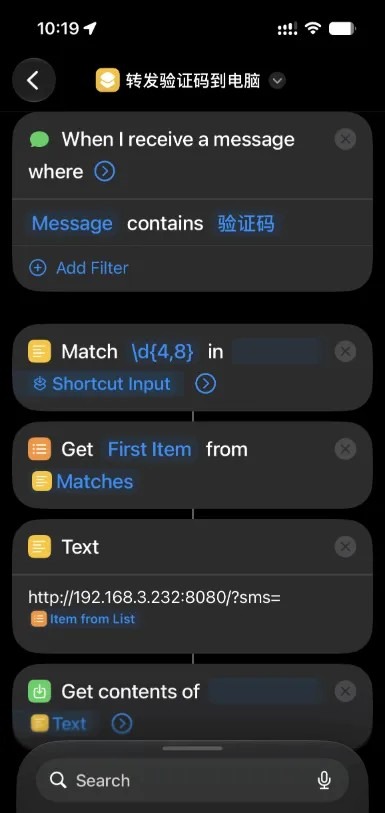
2. 让iPhone和电脑连接同个网络(wifi);
3. 在电脑运行我的程序 sms_notification,sms_notification 使用 rust 编写:你根据平台可以下载附件中的【macOS版本】或【Windows版本】并运行(默认端口8080,当然你也可以在启动程序时传入不同的端口号):
包含mac和windows链接:https://pan.quark.cn/s/51a2245d6fe8
当然,你也可以下载代码自行编译【源码和cargo.toml】然后运行;
4. 在运行 sms_notification 的电脑获取电脑的局域网ip(比如 192.168.3.232):Windows: 使用命令 ipconfig /all 找到本地 ipv4 地址;macOS: 使用命令 ifconfig -a 找到本地 ipv4 地址;修改【工作流】中的 Text 中 网址部分的 ip;
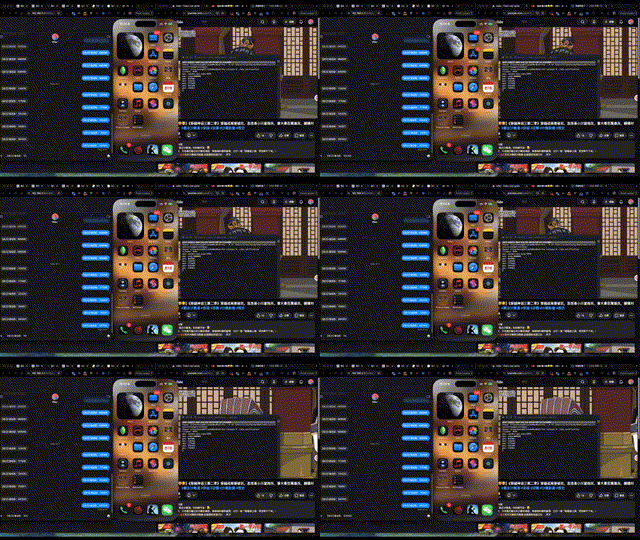
5. 找个发送短信的网页(比如豆包)尝试验证码登陆;
效果展示
源码
如需自行编译,请使用cargo新建一个项目,并使用下方代码替换你的main.rs, cargo.toml。然后使用命令 cargo build –release编译release版本
main.rs
- use clap::Parser;
- use tracing::{info, error};
- use tokio::sync::mpsc;
- use std::convert::Infallible;
- use warp::Filter;
- #[derive(Parser, Debug)]
- #[command(name = “sms_notification”)]
- #[command(about = “HTTP server that copies SMS to clipboard and shows notifications”)]
- struct Args {
- #[arg(short, long, default_value_t = 8080)]
- port: u16,
- }
- #[derive(Clone)]
- struct AppState {
- sms_tx: mpsc::Sender<String>,
- }
- async fn handle_sms(
- query: std::collections::HashMap<String, String>,
- state: AppState,
- ) -> Result<impl warp::Reply, Infallible> {
- if let Some(sms) = query.get(“sms”) {
- let sms_clone = sms.clone();
- if state.sms_tx.send(sms_clone).await.is_err() {
- error!(“Failed to send SMS to notification handler”);
- }
- info!(“Received SMS: {}”, sms);
- println!(“sms: {}”, sms);
- Ok(warp::reply::html(format!(“SMS received: {}”, sms)))
- } else {
- Ok(warp::reply::html(“Usage: GET /?sms=<message>”.to_string()))
- }
- }
- async fn start_http_server(port: u16, sms_tx: mpsc::Sender<String>) {
- let state = AppState { sms_tx };
- let route = warp::path::end()
- .and(warp::get())
- .and(warp::query::<std::collections::HashMap<String, String>>())
- .and(with_state(state))
- .and_then(handle_sms);
- let (_, server) = warp::serve(route)
- .bind_with_graceful_shutdown(([0, 0, 0, 0], port), async {
- tokio::time::sleep(tokio::time::Duration::MAX).await
- });
- info!(“HTTP server listening on port {}”, port);
- server.await;
- }
- fn with_state(state: AppState) -> impl Filter<Extract = (AppState,), Error = Infallible> + Clone {
- warp::any().map(move || state.clone())
- }
- fn copy_to_clipboard(text: &str) -> bool {
- match arboard::Clipboard::new() {
- Ok(mut clipboard) => {
- match clipboard.set_text(text) {
- Ok(_) => {
- info!(“Copied to clipboard: {}”, text);
- true
- }
- Err(e) => {
- error!(“Failed to set clipboard: {:?}”, e);
- false
- }
- }
- }
- Err(e) => {
- error!(“Failed to open clipboard: {:?}”, e);
- false
- }
- }
- }
- fn show_dialog(title: &str, body: &str) {
- let result = rfd::MessageDialog::new()
- .set_title(title)
- .set_description(body)
- .show();
- if !result {
- error!(“Failed to show dialog: show() returned false”);
- } else {
- info!(“Dialog shown: {} – {}”, title, body);
- }
- }
- fn main() {
- // Parse CLI
- let args = Args::parse();
- // Setup logging to file + stdout
- let log_file = std::fs::File::create(“sms_notification.log”).unwrap();
- let (non_blocking, _guard) = tracing_appender::non_blocking(log_file);
- tracing_subscriber::fmt()
- .with_writer(non_blocking)
- .with_ansi(false)
- .init();
- info!(“SMS Notification App starting on port {}”, args.port);
- // Shared state for last SMS (for tray click -> clipboard)
- use std::sync::Arc;
- use tokio::sync::Mutex;
- let last_sms = Arc::new(Mutex::new(String::new()));
- let (sms_tx, mut sms_rx) = mpsc::channel::<String>(100);
- // Clipboard channel receiver — runs in background thread
- let last_sms_for_receiver = last_sms.clone();
- std::thread::spawn(move || {
- let rt = tokio::runtime::Runtime::new().unwrap();
- rt.block_on(async {
- while let Some(sms) = sms_rx.recv().await {
- *last_sms_for_receiver.lock().await = sms.clone();
- copy_to_clipboard(&sms);
- // Show notification in a separate thread to avoid blocking the receiver
- let sms_for_notify = sms.clone();
- std::thread::spawn(move || {
- show_dialog(“SMS Received”, &sms_for_notify);
- });
- }
- });
- });
- // Spawn HTTP server
- let http_port = args.port;
- let sms_tx_clone = sms_tx.clone();
- std::thread::spawn(move || {
- let rt = tokio::runtime::Runtime::new().unwrap();
- rt.block_on(start_http_server(http_port, sms_tx_clone));
- });
- // Build SystemTray with menu
- use tao::{
- menu::{ContextMenu, MenuItemAttributes, MenuId},
- system_tray::{SystemTrayBuilder, Icon},
- event_loop::{EventLoop, ControlFlow, EventLoopWindowTarget},
- };
- // Create a simple 1×1 icon (solid color)
- let icon_data = vec![0u8; 4]; // RGBA: all zeros = transparent black
- let icon = Icon::from_rgba(icon_data, 1, 1).expect(“Failed to create icon”);
- // Build context menu
- let mut menu = ContextMenu::new();
- let about_item = MenuItemAttributes::new(“About”)
- .with_id(MenuId::new(“about”));
- let log_item = MenuItemAttributes::new(“Log”)
- .with_id(MenuId::new(“log”));
- let exit_item = MenuItemAttributes::new(“Exit”)
- .with_id(MenuId::new(“exit”));
- menu.add_item(about_item);
- menu.add_item(log_item);
- menu.add_item(exit_item);
- // Create EventLoop and build SystemTray
- let event_loop: EventLoop<()> = EventLoop::new();
- let window_target: &EventLoopWindowTarget<()> = &event_loop;
- let _system_tray = SystemTrayBuilder::new(icon, Some(menu))
- .with_tooltip(“SMS Notification”)
- .build(window_target)
- .expect(“Failed to build system tray”);
- let last_sms_for_tray = last_sms.clone();
- event_loop.run(move |event, _, control_flow| {
- use tao::event::Event;
- use tao::event::TrayEvent as TrayEventType;
- match event {
- Event::TrayEvent { event: TrayEventType::LeftClick, .. } => {
- // Tray icon left click – copy last SMS to clipboard
- let last = last_sms_for_tray.clone();
- std::thread::spawn(move || {
- let rt = tokio::runtime::Runtime::new().unwrap();
- rt.block_on(async {
- let sms = last.lock().await;
- if !sms.is_empty() {
- copy_to_clipboard(&sms);
- show_dialog(“SMS Copied”, &sms);
- }
- });
- });
- }
- Event::MenuEvent { menu_id, .. } => {
- // Menu item clicked – compare by creating MenuId from same strings
- let about_id = MenuId::new(“about”);
- let log_id = MenuId::new(“log”);
- let exit_id = MenuId::new(“exit”);
- if menu_id == about_id {
- let about_text = format!(“SMS Notification App\nVersion 0.1.0\nPort: {}”, args.port);
- std::thread::spawn(move || {
- show_dialog(“About SMS Notification”, &about_text);
- });
- } else if menu_id == log_id {
- std::thread::spawn(move || {
- if let Ok(log_content) = std::fs::read_to_string(“sms_notification.log”) {
- let lines: Vec<&str> = log_content.lines().rev().take(20).collect();
- show_dialog(“Recent Logs”, &lines.join(“\n”));
- } else {
- show_dialog(“Logs”, “No logs found.”);
- }
- });
- } else if menu_id == exit_id {
- std::process::exit(0);
- }
- }
- _ => {}
- }
- *control_flow = ControlFlow::Wait;
- });
- }
复制代码cargo.toml
- [package]
- name = “sms_notification”
- version = “0.1.0”
- edition = “2021”
- [dependencies]
- tokio = { version = “1”, features = [“full”] }
- warp = “0.3”
- tao = { version = “0.18”, features = [“tray”] }
- arboard = “3”
- tracing = “0.1”
- tracing-subscriber = { version = “0.3”, features = [“env-filter”] }
- tracing-appender = “0.2”
- clap = { version = “4”, features = [“derive”] }
- rfd = “0.11”
- [profile.release]
- strip = true
- lto = true
复制代码