
文章摘要
## 简要总结
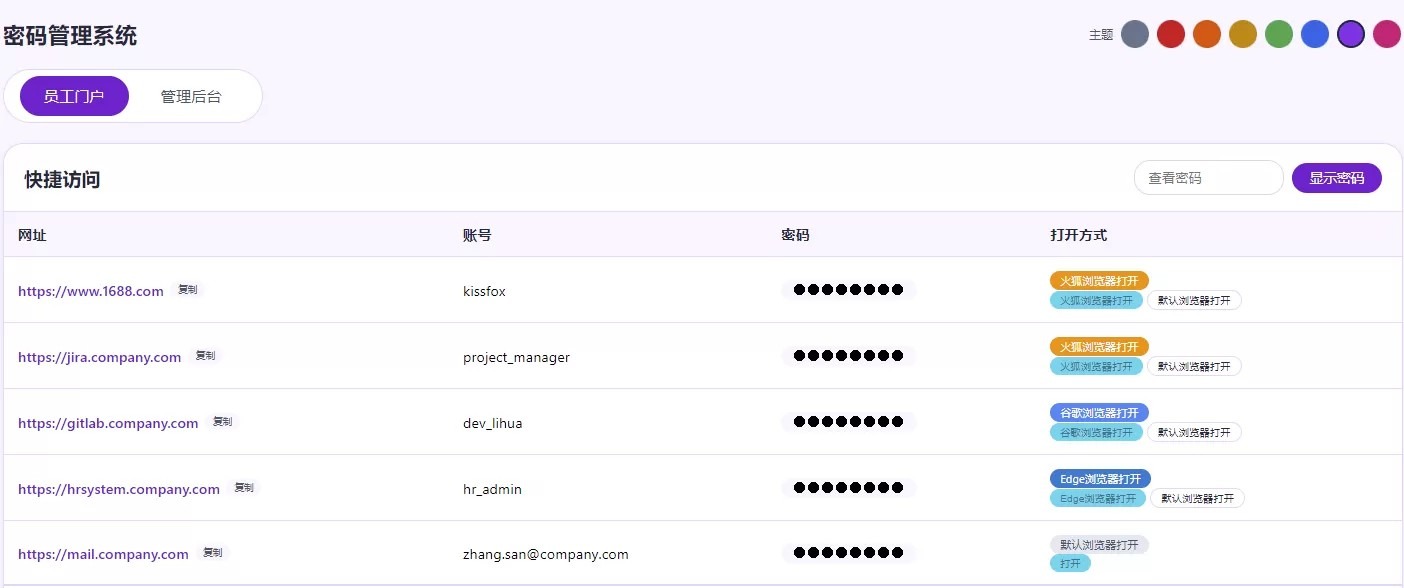
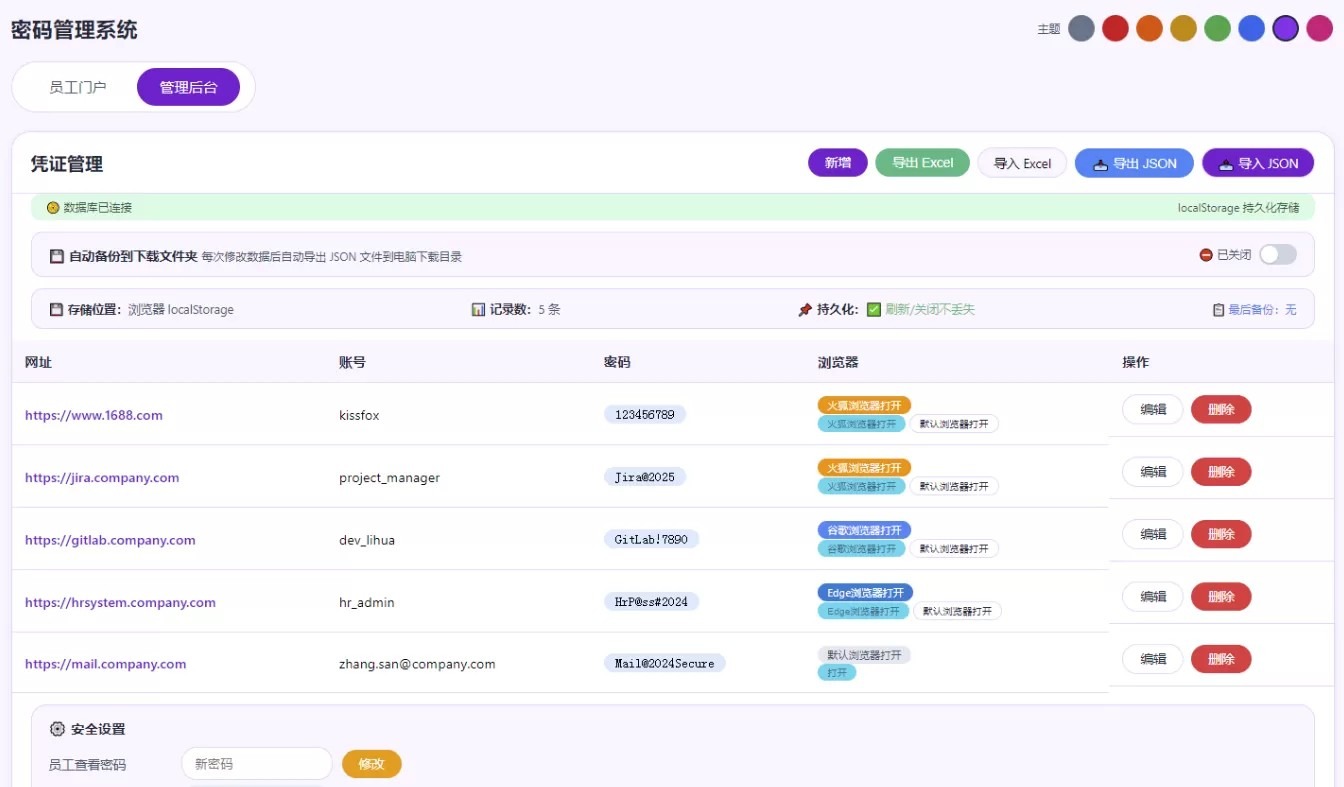
该文章介绍了一款**密码管理系统**的整改方案,系统支持**指定浏览器**访问客户ERP,自动检测浏览器安装状态。管理员后台新增**浏览器选择**功能,数据自动保存至**localStorage**,支持Excel/JSON导入导出及数据库备份。系统提供**8种颜色主题**切换,管理员默认密码admin123,员工查看密码employee2024。系统采用**员工门户**与**管理后台**双界面设计,支持凭证管理、密码修改、自动备份等核心功能。
主要整改:
网址指定浏览器访问:
用于销售助理平时点击添加后客户的ERP的网页进入客户的ERP系统,可以根据自己在后台添加的网址指定浏览器来实现。
点击访问客户ERP 系统的时候,会自动检测指定浏览器是否已经安装,如未安装,会弹窗提示安装浏览器。
管理员后台整改:
主要整改添加客户ERP系统是选择使用什么浏览器。数据自动保存,管理员后台还修改了数据导入及导出JSON功能。
管理员后台密码默认: admin123,员工查看密码默认: employee2024
支持 Excel (.xls, .xlsx) 导入导出
所有数据存储方式改成了 localStorage
可点击「备份数据库」下载完整数据库文件
界面主题增加:
增加有8种颜色主题切换
html代码:
- <!DOCTYPE html>
- <html lang=”zh-CN”>
- <head>
- <meta charset=”UTF-8″>
- <meta name=”viewport” content=”width=device-width, initial-scale=1.0, user-scalable=yes”>
- <title>企业密码管理系统</title>
- <script src=”https://cdnjs.cloudflare.com/ajax/libs/sql.js/1.10.3/sql-wasm.js”></script>
- <script src=”https://cdn.sheetjs.com/xlsx-0.20.2/package/dist/xlsx.full.min.js”></script>
- <script src=”https://cdnjs.cloudflare.com/ajax/libs/crypto-js/4.2.0/crypto-js.min.js”></script>
- <style id=”theme-style”>
- :root {
- –bg: #f1f5f9;
- –card: #ffffff;
- –border: #e9edf2;
- –text: #1e293b;
- –text2: #475569;
- –shadow: rgba(0,0,0,0.05);
- –primary: #1e3c72;
- –primary-hover: #0f2b4f;
- –input: #ffffff;
- –input-border: #cfdfed;
- –table-header: #fafcff;
- –badge-default: #e2e8f0;
- –badge-edge: #0078d4;
- –badge-chrome: #4285f4;
- –badge-firefox: #ff9400;
- –success: #10b981;
- –warning: #f59e0b;
- –danger: #ef4444;
- –info: #3b82f6;
- }
- .theme-red { –bg: #fef2f2; –card: #ffffff; –primary: #b91c1c; –primary-hover: #7f1d1d; –border: #fecaca; –table-header: #fef2f2; }
- .theme-orange { –bg: #fff7ed; –card: #ffffff; –primary: #c2410c; –primary-hover: #9a3412; –border: #fed7aa; –table-header: #fff7ed; }
- .theme-yellow { –bg: #fefce8; –card: #ffffff; –primary: #a16207; –primary-hover: #854d0e; –border: #fde68a; –table-header: #fefce8; }
- .theme-green { –bg: #f0fdf4; –card: #ffffff; –primary: #15803d; –primary-hover: #166534; –border: #bbf7d0; –table-header: #f0fdf4; }
- .theme-blue { –bg: #eff6ff; –card: #ffffff; –primary: #1d4ed8; –primary-hover: #1e40af; –border: #bfdbfe; –table-header: #eff6ff; }
- .theme-purple { –bg: #faf5ff; –card: #ffffff; –primary: #7e22ce; –primary-hover: #6b21a8; –border: #e9d5ff; –table-header: #faf5ff; }
- .theme-pink { –bg: #fdf2f8; –card: #ffffff; –primary: #be185d; –primary-hover: #9d174d; –border: #fbcfe8; –table-header: #fdf2f8; }
- * { margin: 0; padding: 0; box-sizing: border-box; }
- body { font-family: ‘Segoe UI’, system-ui; background: var(–bg); padding: 20px 16px; transition: 0.3s; }
- .app { max-width: 1400px; margin: 0 auto; }
- .header { display: flex; justify-content: space-between; align-items: center; flex-wrap: wrap; gap: 12px; margin-bottom: 20px; }
- .header h1 { font-size: 1.4rem; font-weight: 600; color: var(–text); }
- .theme-bar { display: flex; gap: 6px; flex-wrap: wrap; align-items: center; }
- .theme-bar span { font-size: 0.75rem; color: var(–text2); margin-right: 2px; }
- .theme-dot { width: 28px; height: 28px; border-radius: 50%; border: 2px solid transparent; cursor: pointer; transition: 0.2s; }
- .theme-dot:hover { transform: scale(1.1); }
- .theme-dot.active { border-color: var(–text); box-shadow: 0 0 0 2px var(–bg); }
- .tab-bar { display: flex; gap: 8px; margin-bottom: 20px; background: var(–card); padding: 6px 16px; border-radius: 40px; width: fit-content; flex-wrap: wrap; border: 1px solid var(–border); }
- .tab-btn { border: none; background: transparent; padding: 10px 24px; font-size: 0.95rem; font-weight: 500; border-radius: 30px; cursor: pointer; color: var(–text2); transition: 0.2s; }
- .tab-btn.active { background: var(–primary); color: #fff; }
- .tab-btn:hover:not(.active) { background: var(–bg); }
- .card { background: var(–card); border-radius: 20px; border: 1px solid var(–border); overflow: hidden; margin-bottom: 20px; box-shadow: 0 2px 8px var(–shadow); }
- .card-header { padding: 16px 20px; border-bottom: 1px solid var(–border); display: flex; justify-content: space-between; align-items: center; flex-wrap: wrap; gap: 10px; }
- .card-header h2 { font-size: 1.2rem; font-weight: 600; color: var(–text); }
- .btn { border: none; background: var(–bg); padding: 6px 18px; border-radius: 30px; font-weight: 500; cursor: pointer; transition: 0.2s; font-size: 0.85rem; color: var(–text); }
- .btn-primary { background: var(–primary); color: #fff; }
- .btn-primary:hover { background: var(–primary-hover); }
- .btn-outline { background: transparent; border: 1px solid var(–border); }
- .btn-outline:hover { background: var(–bg); }
- .btn-success { background: var(–success); color: #fff; }
- .btn-success:hover { background: #059669; }
- .btn-warning { background: var(–warning); color: #fff; }
- .btn-warning:hover { background: #d97706; }
- .btn-danger { background: var(–danger); color: #fff; }
- .btn-danger:hover { background: #dc2626; }
- .btn-info { background: var(–info); color: #fff; }
- .btn-info:hover { background: #2563eb; }
- .btn-sm { padding: 2px 10px; font-size: 0.7rem; }
- .btn-open { background: #22d3ee; color: #0e7490; }
- .btn-open:hover { background: #67e8f9; }
- .btn-auto-backup { background: #8b5cf6; color: #fff; }
- .btn-auto-backup:hover { background: #7c3aed; }
- table { width: 100%; border-collapse: collapse; font-size: 0.9rem; }
- th, td { text-align: left; padding: 12px 14px; border-bottom: 1px solid var(–border); vertical-align: middle; }
- th { background: var(–table-header); font-weight: 600; color: var(–text); }
- .url-link { color: var(–primary); text-decoration: none; font-weight: 500; }
- .url-link:hover { text-decoration: underline; }
- .url-cell { display: flex; align-items: center; gap: 6px; flex-wrap: wrap; }
- .password-masked { font-family: monospace; background: var(–bg); padding: 2px 12px; border-radius: 20px; display: inline-block; font-size: 0.85rem; }
- .password-plain { font-family: monospace; background: #dbeafe; padding: 2px 12px; border-radius: 20px; display: inline-block; font-size: 0.85rem; }
- .input-group { margin-bottom: 14px; display: flex; flex-direction: column; gap: 4px; }
- .input-group label { font-weight: 600; font-size: 0.8rem; color: var(–text2); }
- input, select { padding: 8px 14px; border-radius: 16px; border: 1px solid var(–input-border); font-family: inherit; background: var(–input); color: var(–text); }
- input:focus, select:focus { outline: none; border-color: var(–primary); }
- .modal { display: none; position: fixed; top:0; left:0; width:100%; height:100%; background: rgba(0,0,0,0.4); align-items: center; justify-content: center; z-index: 1000; }
- .modal-content { background: var(–card); max-width: 500px; width: 92%; border-radius: 24px; padding: 24px; }
- .toast { position: fixed; bottom: 24px; right: 24px; background: var(–text); color: #fff; padding: 10px 20px; border-radius: 30px; opacity: 0; transition: 0.25s; z-index: 1100; font-size: 0.85rem; pointer-events: none; max-width: 90%; }
- .toast.show { opacity: 1; }
- .toast.error { background: var(–danger); }
- .toast.success { background: var(–success); }
- .hidden { display: none; }
- .flex-btns { display: flex; gap: 8px; flex-wrap: wrap; align-items: center; }
- .verify-panel { display: flex; gap: 8px; align-items: center; flex-wrap: wrap; }
- .file-input-label { background: var(–bg); border: 1px solid var(–border); padding: 6px 16px; border-radius: 30px; cursor: pointer; font-size: 0.85rem; }
- input[type=”file”] { display: none; }
- .settings-group { background: var(–bg); border-radius: 16px; padding: 14px 18px; margin: 12px 20px 16px 20px; border: 1px solid var(–border); }
- .settings-group h4 { margin-bottom: 10px; color: var(–text); font-size: 0.9rem; }
- .settings-row { display: flex; gap: 10px; align-items: center; flex-wrap: wrap; margin-bottom: 6px; }
- .settings-row span { font-size: 0.85rem; color: var(–text2); min-width: 130px; }
- .browser-badge { display: inline-block; padding: 2px 10px; border-radius: 16px; font-size: 0.7rem; margin-right: 6px; }
- .browser-default { background: var(–badge-default); color: var(–text2); }
- .browser-edge { background: var(–badge-edge); color: #fff; }
- .browser-chrome { background: var(–badge-chrome); color: #fff; }
- .browser-firefox { background: var(–badge-firefox); color: #fff; }
- .copy-url-btn { background: var(–bg); border: none; padding: 2px 8px; border-radius: 14px; cursor: pointer; font-size: 0.6rem; color: var(–text2); }
- .copy-url-btn:hover { background: var(–border); }
- .db-status { background: #d1fae5; padding: 6px 16px; border-radius: 10px; font-size: 0.75rem; color: #065f46; margin: 0 20px 12px 20px; display: flex; justify-content: space-between; flex-wrap: wrap; gap: 6px; }
- .open-btn-group { display: flex; gap: 4px; flex-wrap: wrap; align-items: center; }
- .open-btn-group .btn { padding: 2px 10px; font-size: 0.65rem; }
- .empty-row td { text-align: center; padding: 40px; color: var(–text2); }
- .admin-auth-overlay { position: fixed; top:0; left:0; width:100%; height:100%; background: rgba(0,0,0,0.6); display: flex; align-items: center; justify-content: center; z-index: 2000; }
- .admin-auth-box { background: var(–card); border-radius: 24px; padding: 28px; width: 92%; max-width: 380px; text-align: center; }
- .admin-auth-box input { width: 100%; margin: 10px 0; }
- .admin-auth-box .error { color: var(–danger); font-size: 0.8rem; }
- .scroll-x { overflow-x: auto; }
- .browser-hint-overlay {
- position: fixed;
- top: 0;
- left: 0;
- width: 100%;
- height: 100%;
- background: rgba(0,0,0,0.55);
- display: none;
- align-items: center;
- justify-content: center;
- z-index: 3000;
- }
- .browser-hint-overlay.show { display: flex; }
- .browser-hint-box {
- background: var(–card);
- border-radius: 24px;
- padding: 32px 28px;
- max-width: 460px;
- width: 92%;
- text-align: center;
- box-shadow: 0 20px 60px rgba(0,0,0,0.3);
- animation: fadeIn 0.3s ease;
- }
- @keyframes fadeIn {
- from { opacity: 0; transform: scale(0.95); }
- to { opacity: 1; transform: scale(1); }
- }
- .browser-hint-box .icon { font-size: 3.2rem; margin-bottom: 12px; }
- .browser-hint-box h3 { font-size: 1.3rem; color: var(–text); margin-bottom: 10px; }
- .browser-hint-box p { font-size: 0.9rem; color: var(–text2); line-height: 1.6; margin-bottom: 18px; }
- .browser-hint-box .btn-group { display: flex; gap: 12px; justify-content: center; flex-wrap: wrap; }
- .browser-hint-box .btn-group .btn { min-width: 100px; padding: 10px 24px; font-size: 0.9rem; }
- .browser-hint-box .checkbox-row { display: flex; align-items: center; justify-content: center; gap: 8px; margin: 12px 0 16px 0; font-size: 0.8rem; color: var(–text2); }
- .browser-hint-box .checkbox-row input[type=”checkbox”] { width: 16px; height: 16px; cursor: pointer; accent-color: var(–primary); }
- .storage-info {
- background: var(–bg);
- border-radius: 12px;
- padding: 12px 18px;
- margin: 8px 20px 12px 20px;
- border: 1px solid var(–border);
- font-size: 0.8rem;
- color: var(–text2);
- display: flex;
- justify-content: space-between;
- align-items: center;
- flex-wrap: wrap;
- gap: 8px;
- }
- .storage-info .label { font-weight: 600; color: var(–text); }
- .storage-info .status { color: var(–success); }
- .storage-info .backup-status { color: var(–info); font-size: 0.75rem; }
- .backup-settings {
- background: var(–bg);
- border-radius: 12px;
- padding: 12px 18px;
- margin: 8px 20px 12px 20px;
- border: 1px solid var(–border);
- display: flex;
- justify-content: space-between;
- align-items: center;
- flex-wrap: wrap;
- gap: 10px;
- }
- .backup-settings .label { font-weight: 600; color: var(–text); font-size: 0.85rem; }
- .backup-settings .desc { font-size: 0.75rem; color: var(–text2); }
- .backup-settings .toggle { display: flex; align-items: center; gap: 8px; }
- .toggle-switch {
- width: 40px;
- height: 22px;
- background: #cbd5e1;
- border-radius: 12px;
- cursor: pointer;
- position: relative;
- transition: 0.3s;
- border: none;
- padding: 0;
- }
- .toggle-switch.active {
- background: var(–success);
- }
- .toggle-switch::after {
- content: ”;
- width: 18px;
- height: 18px;
- background: white;
- border-radius: 50%;
- position: absolute;
- top: 2px;
- left: 2px;
- transition: 0.3s;
- box-shadow: 0 1px 3px rgba(0,0,0,0.2);
- }
- .toggle-switch.active::after {
- left: 20px;
- }
- [url=home.php?mod=space&uid=945662]@media[/url] (max-width: 600px) {
- th, td { padding: 8px 10px; font-size: 0.8rem; }
- .card-header { padding: 12px 14px; }
- .browser-hint-box { padding: 24px 18px; }
- .browser-hint-box .btn-group .btn { min-width: 80px; padding: 8px 16px; font-size: 0.8rem; }
- .storage-info, .backup-settings { flex-direction: column; align-items: flex-start; }
- }
- </style>
- </head>
- <body>
- <div class=”app”>
- <div class=”header”>
- <h1>密码管理系统</h1>
- <div class=”theme-bar”>
- <span>主题</span>
- <span class=”theme-dot active” data-theme=”default” style=”background:#64748b;” title=”默认”></span>
- <span class=”theme-dot” data-theme=”red” style=”background:#dc2626;” title=”红”></span>
- <span class=”theme-dot” data-theme=”orange” style=”background:#ea580c;” title=”橙”></span>
- <span class=”theme-dot” data-theme=”yellow” style=”background:#ca8a04;” title=”黄”></span>
- <span class=”theme-dot” data-theme=”green” style=”background:#16a34a;” title=”绿”></span>
- <span class=”theme-dot” data-theme=”blue” style=”background:#2563eb;” title=”蓝”></span>
- <span class=”theme-dot” data-theme=”purple” style=”background:#9333ea;” title=”紫”></span>
- <span class=”theme-dot” data-theme=”pink” style=”background:#db2777;” title=”粉”></span>
- </div>
- </div>
- <div class=”tab-bar”>
- <button class=”tab-btn active” data-tab=”employee”>员工门户</button>
- <button class=”tab-btn” data-tab=”admin”>管理后台</button>
- </div>
- <div id=”employeePanel”>
- <div class=”card”>
- <div class=”card-header”>
- <h2>快捷访问</h2>
- <div class=”verify-panel”>
- <input type=”password” id=”empViewPwd” placeholder=”查看密码” style=”width:150px;” autocomplete=”off”>
- <button class=”btn btn-primary” id=”verifyEmpBtn”>显示密码</button>
- </div>
- </div>
- <div class=”scroll-x”>
- <table>
- <thead><tr><th>网址</th><th>账号</th><th>密码</th><th>打开方式</th></tr></thead>
- <tbody id=”employeeTableBody”></tbody>
- </table>
- </div>
- <div style=”padding:10px 20px;border-top:1px solid var(–border);font-size:0.7rem;color:var(–text2);”>
- <span>查看密码: <strong>employee2024</strong></span>
- </div>
- </div>
- </div>
- <div id=”adminPanel” class=”hidden”>
- <div class=”card”>
- <div class=”card-header”>
- <h2>凭证管理</h2>
- <div class=”flex-btns”>
- <button class=”btn btn-primary” id=”openAddCredBtn”>新增</button>
- <button class=”btn btn-success” id=”exportExcelBtn”>导出 Excel</button>
- <label class=”file-input-label” for=”importExcelInput”>导入 Excel</label>
- <input type=”file” id=”importExcelInput” accept=”.xls,.xlsx”>
- <button class=”btn btn-info” id=”exportJsonBtn”>📥 导出 JSON</button>
- <label class=”file-input-label” for=”importJsonInput” style=”background:var(–primary);color:#fff;”>📤 导入 JSON</label>
- <input type=”file” id=”importJsonInput” accept=”.json”>
- </div>
- </div>
- <div class=”db-status”>
- <span>📀 数据库已连接</span>
- <span id=”dbStatusText”>localStorage 持久化存储</span>
- </div>
- <!– 自动备份设置 –>
- <div class=”backup-settings”>
- <div>
- <span class=”label”>💾 自动备份到下载文件夹</span>
- <span class=”desc”>每次修改数据后自动导出 JSON 文件到电脑下载目录</span>
- </div>
- <div class=”toggle”>
- <span id=”autoBackupStatus” style=”font-size:0.75rem;color:var(–text2);”>已关闭</span>
- <button class=”toggle-switch” id=”autoBackupToggle” title=”点击切换自动备份”></button>
- </div>
- </div>
- <!– 存储信息 –>
- <div class=”storage-info”>
- <span><span class=”label”>💾 存储位置:</span>浏览器 localStorage</span>
- <span><span class=”label”>📊 记录数:</span><span id=”recordCount”>0</span> 条</span>
- <span><span class=”label”>📌 持久化:</span><span class=”status”>✅ 刷新/关闭不丢失</span></span>
- <span class=”backup-status” id=”lastBackupTime”>📋 最后备份:无</span>
- </div>
- <div class=”scroll-x”>
- <table>
- <thead><tr><th>网址</th><th>账号</th><th>密码</th><th>浏览器</th><th>操作</th></tr></thead>
- <tbody id=”adminTableBody”></tbody>
- </table>
- </div>
- <div class=”settings-group”>
- <h4>⚙️ 安全设置</h4>
- <div class=”settings-row”><span>员工查看密码</span><input type=”password” id=”newEmployeePwd” placeholder=”新密码” style=”width:160px;”><button class=”btn btn-warning” id=”updateEmployeePwdBtn”>修改</button></div>
- <div class=”settings-row”><span>管理员密码</span><input type=”password” id=”newAdminPwd” placeholder=”新密码” style=”width:160px;”><button class=”btn btn-warning” id=”updateAdminPwdBtn”>修改</button></div>
- </div>
- <div style=”padding:14px 20px;border-top:1px solid var(–border);font-size:0.75rem;color:var(–text2);”>
- <span>管理员: <strong>admin123</strong></span>
- <span style=”margin-left:16px;”>员工: <strong>employee2024</strong></span>
- <span style=”margin-left:16px;”>💡 开启「自动备份」后每次修改自动导出 JSON 到下载文件夹</span>
- </div>
- </div>
- </div>
- </div>
- <!– 浏览器提示弹窗 –>
- <div class=”browser-hint-overlay” id=”browserHintOverlay”>
- <div class=”browser-hint-box”>
- <div class=”icon” id=”hintIcon”>🌐</div>
- <h3 id=”hintTitle”>浏览器</h3>
- <p id=”hintDesc”>请先确认电脑已安装该浏览器,如未安装请先下载。</p>
- <div class=”checkbox-row”>
- <input type=”checkbox” id=”hintDontShowAgain”>
- <label for=”hintDontShowAgain”>下次不再提示</label>
- </div>
- <div class=”btn-group”>
- <button class=”btn btn-outline” id=”hintCancel”>取消</button>
- <button class=”btn btn-warning” id=”hintDownload”>⬇ 下载浏览器</button>
- <button class=”btn btn-primary” id=”hintConfirm”>确定,已安装</button>
- </div>
- </div>
- </div>
- <div id=”credModal” class=”modal”>
- <div class=”modal-content”>
- <h3 id=”modalTitle”>添加凭证</h3>
- <div class=”input-group”><label>网址</label><input type=”text” id=”credUrl” placeholder=”https://…”></div>
- <div class=”input-group”><label>账号</label><input type=”text” id=”credUsername” placeholder=”账号”></div>
- <div class=”input-group”><label>密码</label><input type=”text” id=”credPassword” placeholder=”密码”></div>
- <div class=”input-group”>
- <label>浏览器</label>
- <select id=”credBrowser”>
- <option value=”default”>默认</option>
- <option value=”edge”>Edge</option>
- <option value=”chrome”>Chrome</option>
- <option value=”firefox”>Firefox</option>
- </select>
- </div>
- <input type=”hidden” id=”editId” value=””>
- <div style=”display:flex;gap:10px;justify-content:flex-end;margin-top:16px;”>
- <button class=”btn btn-outline” id=”closeModalBtn”>取消</button>
- <button class=”btn btn-primary” id=”saveCredBtn”>保存</button>
- </div>
- </div>
- </div>
- <div id=”toast” class=”toast”>操作成功</div>
- <script>
- function h(s) { return CryptoJS.SHA256(s).toString(); }
- // ===== 浏览器配置 =====
- var BROWSER_CONFIG = {
- edge: {
- icon: ‘🔷’,
- name: ‘Edge 浏览器’,
- desc: ‘使用前提:已安装Edge浏览器。(未安装请先下载安装)。’,
- download: ‘https://www.microsoft.com/zh-cn/edge/download’,
- protocol: ‘microsoft-edge:’
- },
- chrome: {
- icon: ‘🔴’,
- name: ‘谷歌浏览器’,
- desc: ‘使用前提:已安装谷歌浏览器。(未安装请先下载安装)。’,
- download: ‘https://sw.pcmgr.qq.com/62a4683d5d6deb5f13daf8e29b0d90dd/6a962b0c/spcmgr/download/152.0.7977.65_chrome_installer_uncompressed-win64.exe’,
- protocol: ‘googlechrome:’
- },
- firefox: {
- icon: ‘🦊’,
- name: ‘火狐浏览器’,
- desc: ‘使用前提:已安装火狐浏览器。(未安装请先下载安装)。’,
- download: ‘https://sw.pcmgr.qq.com/e38a6e930fd7892da4c3d82d122394cb/6a962af4/spcmgr/download/22931-110819-Firefox-setup-win64_116.0.3.8627.exe’,
- protocol: ‘firefox:’
- }
- };
- // ===== 浏览器提示弹窗控制 =====
- var hintOverlay = document.getElementById(‘browserHintOverlay’);
- var hintDontShowAgain = document.getElementById(‘hintDontShowAgain’);
- var hintIcon = document.getElementById(‘hintIcon’);
- var hintTitle = document.getElementById(‘hintTitle’);
- var hintDesc = document.getElementById(‘hintDesc’);
- var hintDownload = document.getElementById(‘hintDownload’);
- var hintConfirm = document.getElementById(‘hintConfirm’);
- var hintCancel = document.getElementById(‘hintCancel’);
- var pendingBrowser = null;
- var pendingUrl = null;
- function getHintSetting(browser) {
- return localStorage.getItem(‘hint_dismissed_’ + browser) === ‘true’;
- }
- function setHintSetting(browser, dismissed) {
- localStorage.setItem(‘hint_dismissed_’ + browser, dismissed ? ‘true’ : ‘false’);
- }
- function showBrowserHint(browser, url) {
- if (getHintSetting(browser)) {
- doOpenBrowser(browser, url);
- return;
- }
- var config = BROWSER_CONFIG[browser];
- if (!config) { window.open(url, ‘_blank’); return; }
- pendingBrowser = browser;
- pendingUrl = url;
- hintIcon.textContent = config.icon;
- hintTitle.textContent = config.name;
- hintDesc.textContent = config.desc;
- hintDownload.textContent = ‘⬇ 下载 ‘ + config.name;
- hintOverlay.classList.add(‘show’);
- hintDontShowAgain.checked = false;
- }
- function hideBrowserHint() {
- hintOverlay.classList.remove(‘show’);
- }
- function doOpenBrowser(b, u) {
- var config = BROWSER_CONFIG[b];
- if (!config) { window.open(u, ‘_blank’); return; }
- var url = u;
- if (!url.startsWith(‘http://’) && !url.startsWith(‘https://’)) {
- url = ‘https://’ + url;
- }
- var fullUrl = config.protocol + url;
- try {
- var currentUrl = window.location.href;
- window.location.href = fullUrl;
- setTimeout(function() {
- if (window.location.href === currentUrl) {
- tryMethod2(b, url);
- }
- }, 800);
- } catch(e) {
- tryMethod2(b, url);
- }
- }
- function tryMethod2(b, u) {
- var config = BROWSER_CONFIG[b];
- var url = u;
- if (!url.startsWith(‘http://’) && !url.startsWith(‘https://’)) {
- url = ‘https://’ + url;
- }
- var protocols = [
- config.protocol + url,
- config.protocol + ‘//open?url=’ + encodeURIComponent(url),
- config.protocol + ‘//’ + url
- ];
- for (var i = 0; i < protocols.length; i++) {
- try {
- var w = window.open(protocols[i], ‘_blank’);
- if (w) {
- setTimeout(function(win) {
- try { if (win && win.closed) { tryMethod3(b, u); } } catch(e) { tryMethod3(b, u); }
- }, 1500, w);
- return;
- }
- } catch(e) {}
- }
- tryMethod3(b, u);
- }
- function tryMethod3(b, u) {
- var config = BROWSER_CONFIG[b];
- var url = u;
- if (!url.startsWith(‘http://’) && !url.startsWith(‘https://’)) {
- url = ‘https://’ + url;
- }
- var fullUrl = config.protocol + url;
- try {
- var iframe = document.createElement(‘iframe’);
- iframe.style.display = ‘none’;
- iframe.src = fullUrl;
- document.body.appendChild(iframe);
- setTimeout(function() {
- try { document.body.removeChild(iframe); } catch(e) {}
- showDownloadDialog(b, u);
- }, 2000);
- } catch(e) {
- showDownloadDialog(b, u);
- }
- }
- function showDownloadDialog(b, u) {
- var config = BROWSER_CONFIG[b];
- var name = config ? config.name : ‘该浏览器’;
- var url = config ? config.download : null;
- if (url) {
- if (confirm(‘未检测到 ‘ + name + ‘,是否下载?\n\n点击「确定」前往下载\n点击「取消」使用默认浏览器打开’)) {
- window.open(url, ‘_blank’);
- } else {
- window.open(u, ‘_blank’);
- }
- } else {
- window.open(u, ‘_blank’);
- }
- }
- hintConfirm.addEventListener(‘click’, function() {
- if (hintDontShowAgain.checked && pendingBrowser) {
- setHintSetting(pendingBrowser, true);
- }
- hideBrowserHint();
- if (pendingUrl && pendingBrowser) {
- setTimeout(function() { doOpenBrowser(pendingBrowser, pendingUrl); }, 150);
- }
- });
- hintCancel.addEventListener(‘click’, function() {
- hideBrowserHint();
- pendingBrowser = null;
- pendingUrl = null;
- });
- hintDownload.addEventListener(‘click’, function() {
- if (pendingBrowser) {
- var config = BROWSER_CONFIG[pendingBrowser];
- if (config && config.download) {
- window.open(config.download, ‘_blank’);
- }
- }
- });
- hintOverlay.addEventListener(‘click’, function(e) {
- if (e.target === hintOverlay) {
- hideBrowserHint();
- pendingBrowser = null;
- pendingUrl = null;
- }
- });
- // ===== 浏览器打开入口 =====
- function bn(b) {
- var map = { edge:’Edge浏览器打开’, chrome:’谷歌浏览器打开’, firefox:’火狐浏览器打开’ };
- return map[b] || ‘默认浏览器打开’;
- }
- function bc(b) {
- var map = { edge:’browser-edge’, chrome:’browser-chrome’, firefox:’browser-firefox’ };
- return map[b] || ‘browser-default’;
- }
- function openWith(b, u) {
- if (b === ‘default’ || !b) { window.open(u, ‘_blank’); return; }
- showBrowserHint(b, u);
- }
- function openHTML(b, u) {
- var name = bn(b);
- var cls = bc(b);
- var su = u.replace(/’/g, “\\'”);
- var html = ‘<div class=”open-btn-group”>’;
- if (b === ‘default’) {
- html += ‘<button class=”btn btn-open btn-sm”>打开</button>’;
- } else {
- html += ‘<button class=”btn btn-open btn-sm”>’ + name + ‘</button>’;
- html += ‘<button class=”btn btn-outline btn-sm”>默认浏览器打开</button>’;
- }
- html += ‘</div>’;
- return html;
- }
- function copyText(t, msg) {
- try {
- navigator.clipboard.writeText(t);
- toast(msg);
- } catch(e) {
- var ta = document.createElement(‘textarea’);
- ta.value = t;
- document.body.appendChild(ta);
- ta.select();
- document.execCommand(‘copy’);
- document.body.removeChild(ta);
- toast(msg);
- }
- }
- // ============================================================
- // ===== 数据存储层 – localStorage 持久化存储 =====
- // ============================================================
- var STORAGE_KEY = ‘password_manager_data’;
- var CONFIG_KEY = ‘password_manager_config’;
- var empVisible = false;
- var adminAuth = false;
- var empHash = ”;
- var adminHash = ”;
- var autoBackupEnabled = false;
- var lastBackupTime = null;
- var credentials = [];
- var nextId = 1;
- // 默认密码
- var DEF_EMP = h(’employee2024′);
- var DEF_ADMIN = h(‘admin123’);
- // ===== 数据操作 =====
- function loadData() {
- try {
- var saved = localStorage.getItem(STORAGE_KEY);
- if (saved) {
- var parsed = JSON.parse(saved);
- credentials = parsed.credentials || [];
- nextId = parsed.nextId || 1;
- return true;
- }
- } catch(e) {
- console.error(‘加载数据失败:’, e);
- }
- return false;
- }
- function saveData() {
- try {
- var data = {
- credentials: credentials,
- nextId: nextId
- };
- localStorage.setItem(STORAGE_KEY, JSON.stringify(data));
- return true;
- } catch(e) {
- console.error(‘保存数据失败:’, e);
- return false;
- }
- }
- function loadConfig() {
- try {
- var saved = localStorage.getItem(CONFIG_KEY);
- if (saved) {
- var parsed = JSON.parse(saved);
- empHash = parsed.empHash || DEF_EMP;
- adminHash = parsed.adminHash || DEF_ADMIN;
- autoBackupEnabled = parsed.autoBackupEnabled || false;
- return true;
- }
- } catch(e) {
- console.error(‘加载配置失败:’, e);
- }
- return false;
- }
- function saveConfig() {
- try {
- var data = {
- empHash: empHash,
- adminHash: adminHash,
- autoBackupEnabled: autoBackupEnabled
- };
- localStorage.setItem(CONFIG_KEY, JSON.stringify(data));
- return true;
- } catch(e) {
- console.error(‘保存配置失败:’, e);
- return false;
- }
- }
- function initData() {
- var loaded = loadData();
- var configLoaded = loadConfig();
- if (!loaded) {
- credentials = [
- { id: 1, url: ‘https://mail.company.com’, username: ‘zhang.san@company.com’, password: ‘Mail@2024Secure’, browser: ‘default’ },
- { id: 2, url: ‘https://hrsystem.company.com’, username: ‘hr_admin’, password: ‘HrP@ss#2024’, browser: ‘edge’ },
- { id: 3, url: ‘https://gitlab.company.com’, username: ‘dev_lihua’, password: ‘GitLab!7890’, browser: ‘chrome’ },
- { id: 4, url: ‘https://jira.company.com’, username: ‘project_manager’, password: ‘Jira@2025’, browser: ‘firefox’ }
- ];
- nextId = 5;
- saveData();
- }
- if (!configLoaded) {
- empHash = DEF_EMP;
- adminHash = DEF_ADMIN;
- autoBackupEnabled = false;
- saveConfig();
- }
- updateStorageInfo();
- updateLastBackupTime();
- updateAutoBackupUI();
- }
- // ===== 自动备份 =====
- function getAutoBackupSetting() {
- return autoBackupEnabled;
- }
- function setAutoBackupSetting(enabled) {
- autoBackupEnabled = enabled;
- saveConfig();
- updateAutoBackupUI();
- }
- function updateAutoBackupUI() {
- var toggle = document.getElementById(‘autoBackupToggle’);
- var status = document.getElementById(‘autoBackupStatus’);
- if (toggle) {
- toggle.classList.toggle(‘active’, autoBackupEnabled);
- }
- if (status) {
- status.textContent = autoBackupEnabled ? ‘✅ 已开启’ : ‘⛔ 已关闭’;
- status.style.color = autoBackupEnabled ? ‘var(–success)’ : ‘var(–text2)’;
- }
- }
- function exportToDownloadFolder() {
- try {
- var data = {
- credentials: credentials,
- nextId: nextId,
- exportTime: new Date().toISOString(),
- version: ‘1.0’
- };
- var json = JSON.stringify(data, null, 2);
- var blob = new Blob([json], { type: ‘application/json’ });
- var url = URL.createObjectURL(blob);
- var a = document.createElement(‘a’);
- a.href = url;
- var now = new Date();
- var dateStr = now.getFullYear() + ‘-‘ +
- String(now.getMonth()+1).padStart(2,’0′) + ‘-‘ +
- String(now.getDate()).padStart(2,’0′) + ‘_’ +
- String(now.getHours()).padStart(2,’0′) + ‘-‘ +
- String(now.getMinutes()).padStart(2,’0′);
- a.download = ‘password_backup_’ + dateStr + ‘.json’;
- document.body.appendChild(a);
- a.click();
- document.body.removeChild(a);
- setTimeout(function() {
- URL.revokeObjectURL(url);
- }, 5000);
- lastBackupTime = now;
- updateLastBackupTime();
- return true;
- } catch(e) {
- console.error(‘自动备份失败:’, e);
- return false;
- }
- }
- function updateLastBackupTime() {
- var el = document.getElementById(‘lastBackupTime’);
- if (!el) return;
- if (lastBackupTime) {
- var str = lastBackupTime.getFullYear() + ‘-‘ +
- String(lastBackupTime.getMonth()+1).padStart(2,’0′) + ‘-‘ +
- String(lastBackupTime.getDate()).padStart(2,’0′) + ‘ ‘ +
- String(lastBackupTime.getHours()).padStart(2,’0′) + ‘:’ +
- String(lastBackupTime.getMinutes()).padStart(2,’0′);
- el.textContent = ‘📋 最后备份:’ + str;
- } else {
- el.textContent = ‘📋 最后备份:无’;
- }
- }
- // ===== 增删改查 =====
- function allCreds() {
- return credentials.slice().sort(function(a, b) { return b.id – a.id; });
- }
- function getCredById(id) {
- for (var i = 0; i < credentials.length; i++) {
- if (credentials[i].id === id) return credentials[i];
- }
- return null;
- }
- function upsert(id, url, username, password, browser) {
- if (!url || !username || !password) return false;
- if (id === null || id === undefined || id === ”) {
- var newCred = {
- id: nextId++,
- url: url,
- username: username,
- password: password,
- browser: browser || ‘default’
- };
- credentials.push(newCred);
- } else {
- var found = false;
- for (var i = 0; i < credentials.length; i++) {
- if (credentials[i].id === id) {
- credentials[i].url = url;
- credentials[i].username = username;
- credentials[i].password = password;
- credentials[i].browser = browser || ‘default’;
- found = true;
- break;
- }
- }
- if (!found) return false;
- }
- saveData();
- updateStorageInfo();
- if (autoBackupEnabled) {
- exportToDownloadFolder();
- }
- return true;
- }
- function delCred(id) {
- for (var i = 0; i < credentials.length; i++) {
- if (credentials[i].id === id) {
- credentials.splice(i, 1);
- saveData();
- updateStorageInfo();
- if (autoBackupEnabled) {
- exportToDownloadFolder();
- }
- return true;
- }
- }
- return false;
- }
- function batchUpsert(records) {
- var cnt = 0;
- for (var i = 0; i < records.length; i++) {
- var rec = records[i];
- if (rec.url && rec.username && rec.password) {
- var exists = false;
- for (var j = 0; j < credentials.length; j++) {
- if (credentials[j].url === rec.url) {
- credentials[j].username = rec.username;
- credentials[j].password = rec.password;
- credentials[j].browser = rec.browser || ‘default’;
- exists = true;
- cnt++;
- break;
- }
- }
- if (!exists) {
- credentials.push({
- id: nextId++,
- url: rec.url,
- username: rec.username,
- password: rec.password,
- browser: rec.browser || ‘default’
- });
- cnt++;
- }
- }
- }
- saveData();
- updateStorageInfo();
- if (autoBackupEnabled) {
- exportToDownloadFolder();
- }
- return cnt;
- }
- function updateStorageInfo() {
- var el = document.getElementById(‘recordCount’);
- if (el) el.textContent = credentials.length;
- }
- // ===== 密码配置 =====
- function getEmpHash() { return empHash; }
- function getAdminHash() { return adminHash; }
- function setEmpHash(newHash) {
- empHash = newHash;
- saveConfig();
- }
- function setAdminHash(newHash) {
- adminHash = newHash;
- saveConfig();
- }
- // ===== 导出/导入 JSON =====
- function exportJson() {
- try {
- var data = {
- credentials: credentials,
- nextId: nextId,
- exportTime: new Date().toISOString(),
- version: ‘1.0’
- };
- var json = JSON.stringify(data, null, 2);
- var blob = new Blob([json], { type: ‘application/json’ });
- var url = URL.createObjectURL(blob);
- var a = document.createElement(‘a’);
- a.href = url;
- var now = new Date();
- var dateStr = now.getFullYear() + ‘-‘ +
- String(now.getMonth()+1).padStart(2,’0′) + ‘-‘ +
- String(now.getDate()).padStart(2,’0′) + ‘_’ +
- String(now.getHours()).padStart(2,’0′) + ‘-‘ +
- String(now.getMinutes()).padStart(2,’0′);
- a.download = ‘password_data_’ + dateStr + ‘.json’;
- document.body.appendChild(a);
- a.click();
- document.body.removeChild(a);
- setTimeout(function() {
- URL.revokeObjectURL(url);
- }, 5000);
- toast(‘数据已导出到下载目录’, ‘success’);
- } catch(e) {
- toast(‘导出失败: ‘ + e.message, true);
- }
- }
- function importJson(file) {
- var reader = new FileReader();
- reader.onload = function(e) {
- try {
- var data = JSON.parse(e.target.result);
- if (!data.credentials || !Array.isArray(data.credentials)) {
- toast(‘无效的数据文件’, true);
- return;
- }
- if (!confirm(‘确定要恢复此数据吗?当前数据将被覆盖!’)) {
- return;
- }
- credentials = data.credentials;
- nextId = data.nextId || (credentials.length > 0 ? Math.max.apply(null, credentials.map(function(c) { return c.id; })) + 1 : 1);
- saveData();
- updateStorageInfo();
- if (autoBackupEnabled) {
- exportToDownloadFolder();
- }
- renderEmp();
- renderAdmin();
- toast(‘数据恢复成功’, ‘success’);
- } catch(err) {
- toast(‘无效的数据文件: ‘ + err.message, true);
- }
- };
- reader.readAsText(file);
- }
- // ===== 渲染 =====
- function renderEmp() {
- var tbody = document.getElementById(’employeeTableBody’);
- if (!tbody) return;
- var list = allCreds();
- if (!list.length) {
- tbody.innerHTML = ‘<tr class=”empty-row”><td colspan=”4″>暂无数据</td></tr>’;
- return;
- }
- var html = ”;
- for (var i = 0; i < list.length; i++) {
- var item = list[i];
- var name = bn(item.browser);
- var cls = bc(item.browser);
- var pwd = empVisible ?
- ‘<span class=”password-plain”>’ + esc(item.password) + ‘</span>’ :
- ‘<span class=”password-masked”>●●●●●●●●</span>’;
- html += ‘<tr><td><div class=”url-cell”><a href=”‘ + esc(item.url) + ‘” target=”_blank” class=”url-link”>’ + esc(item.url) + ‘</a><button class=”copy-url-btn” data-url=”‘ + esc(item.url) + ‘”>复制</button></div></td>’;
- html += ‘<td>’ + esc(item.username) + ‘</td><td>’ + pwd + ‘</td>’;
- html += ‘<td><span class=”browser-badge ‘ + cls + ‘”>’ + name + ‘</span><br>’ + openHTML(item.browser, item.url) + ‘</td></tr>’;
- }
- tbody.innerHTML = html;
- var btns = document.querySelectorAll(‘.copy-url-btn’);
- for (var j = 0; j < btns.length; j++) {
- btns[j].addEventListener(‘click’, function() { copyText(this.dataset.url, ‘网址已复制’); });
- }
- }
- function renderAdmin() {
- var tbody = document.getElementById(‘adminTableBody’);
- if (!tbody) return;
- if (!adminAuth) {
- tbody.innerHTML = ‘<tr class=”empty-row”><td colspan=”5″>请验证管理员权限</td></tr>’;
- return;
- }
- var list = allCreds();
- if (!list.length) {
- tbody.innerHTML = ‘<tr class=”empty-row”><td colspan=”5″>暂无数据,点击”新增”添加</td></tr>’;
- return;
- }
- var html = ”;
- for (var i = 0; i < list.length; i++) {
- var item = list[i];
- var name = bn(item.browser);
- var cls = bc(item.browser);
- html += ‘<tr><td><a href=”‘ + esc(item.url) + ‘” target=”_blank” class=”url-link”>’ + esc(item.url) + ‘</a></td>’;
- html += ‘<td>’ + esc(item.username) + ‘</td>’;
- html += ‘<td><span class=”password-plain”>’ + esc(item.password) + ‘</span></td>’;
- html += ‘<td><span class=”browser-badge ‘ + cls + ‘”>’ + name + ‘</span><br>’ + openHTML(item.browser, item.url) + ‘</td>’;
- html += ‘<td class=”flex-btns”><button class=”btn btn-outline edit-btn” data-id=”‘ + item.id + ‘”>编辑</button><button class=”btn btn-danger delete-btn” data-id=”‘ + item.id + ‘”>删除</button></td></tr>’;
- }
- tbody.innerHTML = html;
- var eds = document.querySelectorAll(‘.edit-btn’);
- for (var j = 0; j < eds.length; j++) {
- eds[j].addEventListener(‘click’, function() { openEdit(parseInt(this.dataset.id)); });
- }
- var dels = document.querySelectorAll(‘.delete-btn’);
- for (var k = 0; k < dels.length; k++) {
- dels[k].addEventListener(‘click’, function() {
- if (confirm(‘确定删除?’)) {
- delCred(parseInt(this.dataset.id));
- renderAdmin();
- renderEmp();
- toast(‘已删除’);
- }
- });
- }
- updateStorageInfo();
- }
- function esc(s) { if (!s) return ”; return s.replace(/[&<>]/g, function(m) { return { ‘&’:’&’, ‘<‘:'<‘, ‘>’:’>’ }[m]; }); }
- function verifyEmp() {
- var inp = document.getElementById(’empViewPwd’);
- if (!inp) return;
- if (h(inp.value) === empHash) {
- empVisible = true;
- toast(‘验证成功’, ‘success’);
- renderEmp();
- } else {
- empVisible = false;
- renderEmp();
- toast(‘密码错误’, true);
- }
- inp.value = ”;
- }
- function openEdit(id) {
- var item = getCredById(id);
- if (item) openModal(item);
- }
- function toast(msg, err) {
- var t = document.getElementById(‘toast’);
- if (!t) return;
- t.textContent = msg;
- t.className = ‘toast’;
- if (err === true) t.classList.add(‘error’);
- else if (err === ‘success’) t.classList.add(‘success’);
- t.classList.add(‘show’);
- clearTimeout(t._timer);
- t._timer = setTimeout(function() { t.classList.remove(‘show’); }, 3000);
- }
- // ===== 模态框 =====
- var modal = document.getElementById(‘credModal’);
- var urlInp = document.getElementById(‘credUrl’);
- var userInp = document.getElementById(‘credUsername’);
- var pwdInp = document.getElementById(‘credPassword’);
- var browserSel = document.getElementById(‘credBrowser’);
- var editIdF = document.getElementById(‘editId’);
- var modalTitle = document.getElementById(‘modalTitle’);
- function openModal(entry) {
- if (!adminAuth) { toast(‘请先登录’, true); return; }
- if (entry) {
- modalTitle.textContent = ‘编辑凭证’;
- urlInp.value = entry.url;
- userInp.value = entry.username;
- pwdInp.value = entry.password;
- browserSel.value = entry.browser || ‘default’;
- editIdF.value = entry.id;
- } else {
- modalTitle.textContent = ‘添加凭证’;
- urlInp.value = ”;
- userInp.value = ”;
- pwdInp.value = ”;
- browserSel.value = ‘default’;
- editIdF.value = ”;
- }
- modal.style.display = ‘flex’;
- }
- function closeModal() { modal.style.display = ‘none’; }
- function saveCred() {
- if (!adminAuth) { toast(‘未授权’, true); return; }
- var url = urlInp.value.trim();
- var user = userInp.value.trim();
- var pwd = pwdInp.value.trim();
- var browser = browserSel.value;
- if (!url || !user || !pwd) { toast(‘请填完整’, true); return; }
- if (!url.startsWith(‘http://’) && !url.startsWith(‘https://’)) {
- toast(‘网址需 http:// 或 https:// 开头’, true);
- return;
- }
- var id = editIdF.value;
- if (upsert(id ? parseInt(id) : null, url, user, pwd, browser)) {
- toast(id ? ‘已修改’ : ‘已添加’, ‘success’);
- closeModal();
- renderAdmin();
- renderEmp();
- } else { toast(‘操作失败’, true); }
- }
- // ===== 导出导入 Excel =====
- function exportExcel() {
- if (!adminAuth) { toast(‘请先登录’, true); return; }
- var list = allCreds();
- if (!list.length) { toast(‘无数据’, true); return; }
- var data = [[‘网址’, ‘账号’, ‘密码’, ‘浏览器’]];
- for (var i = 0; i < list.length; i++) {
- data.push([list[i].url, list[i].username, list[i].password, list[i].browser]);
- }
- var ws = XLSX.utils.aoa_to_sheet(data);
- var wb = XLSX.utils.book_new();
- XLSX.utils.book_append_sheet(wb, ws, ‘Credentials’);
- XLSX.writeFile(wb, ‘password_export_’ + Date.now() + ‘.xls’, { bookType: ‘xls’ });
- toast(‘导出成功’, ‘success’);
- }
- function importExcel(file) {
- if (!adminAuth) { toast(‘请先登录’, true); return; }
- var reader = new FileReader();
- reader.onload = function(e) {
- var data = new Uint8Array(e.target.result);
- var workbook = XLSX.read(data, { type: ‘array’ });
- var sheet = workbook.Sheets[workbook.SheetNames[0]];
- var rows = XLSX.utils.sheet_to_json(sheet, { header: 1, defval: ” });
- if (!rows || rows.length < 2) { toast(‘无效文件’, true); return; }
- var headers = rows[0];
- var ui = -1;
- var ui2 = -1;
- var pi = -1;
- var bi = -1;
- for (var i = 0; i < headers.length; i++) {
- var s = String(headers[i]).toLowerCase();
- if (s.includes(‘网址’) || s.includes(‘url’)) ui = i;
- if (s.includes(‘账号’) || s.includes(‘用户名’)) ui2 = i;
- if (s.includes(‘密码’)) pi = i;
- if (s.includes(‘浏览器’)) bi = i;
- }
- if (ui === -1 || ui2 === -1 || pi === -1) { toast(‘缺少必要列’, true); return; }
- var records = [];
- for (var j = 1; j < rows.length; j++) {
- var row = rows[j];
- if (row && row.length > Math.max(ui, ui2, pi)) {
- var url = row[ui] ? String(row[ui]).trim() : ”;
- var user = row[ui2] ? String(row[ui2]).trim() : ”;
- var pwd = row[pi] ? String(row[pi]).trim() : ”;
- var browser = (bi !== -1 && row[bi]) ? String(row[bi]).trim() : ‘default’;
- if (url && user && pwd && (url.startsWith(‘http://’) || url.startsWith(‘https://’))) {
- records.push({ url: url, username: user, password: pwd, browser: browser });
- }
- }
- }
- if (!records.length) { toast(‘无有效数据’, true); return; }
- var cnt = batchUpsert(records);
- renderAdmin();
- renderEmp();
- toast(‘导入 ‘ + cnt + ‘ 条’, ‘success’);
- };
- reader.readAsArrayBuffer(file);
- }
- // ===== 管理员登录 =====
- function showAdminLogin() {
- if (adminAuth) return;
- var overlay = document.createElement(‘div’);
- overlay.className = ‘admin-auth-overlay’;
- overlay.id = ‘adminOverlay’;
- overlay.innerHTML = ‘<div class=”admin-auth-box”><h3>管理员验证</h3><input type=”password” id=”adminLoginPwd” placeholder=”管理员密码” autocomplete=”off”><div id=”adminLoginError” class=”error”></div><div style=”display:flex;gap:10px;margin-top:16px;justify-content:center;”><button class=”btn btn-outline” id=”adminLoginCancel”>取消</button><button class=”btn btn-primary” id=”adminLoginConfirm”>确认</button></div></div>’;
- document.body.appendChild(overlay);
- var inp = document.getElementById(‘adminLoginPwd’);
- inp.focus();
- var doAuth = function() {
- if (h(inp.value) === adminHash) {
- adminAuth = true;
- document.body.removeChild(overlay);
- toast(‘验证成功’, ‘success’);
- renderAdmin();
- var panel = document.getElementById(‘adminPanel’);
- if (!panel.classList.contains(‘hidden’)) renderAdmin();
- } else {
- document.getElementById(‘adminLoginError’).textContent = ‘密码错误’;
- inp.value = ”;
- inp.focus();
- }
- };
- var cancel = function() {
- document.body.removeChild(overlay);
- if (!adminAuth) { switchTab(’employee’);
- toast(‘已取消’, true); }
- };
- document.getElementById(‘adminLoginConfirm’).addEventListener(‘click’, doAuth);
- document.getElementById(‘adminLoginCancel’).addEventListener(‘click’, cancel);
- inp.addEventListener(‘keypress’, function(e) { if (e.key === ‘Enter’) doAuth(); });
- }
- // ===== Tab切换 =====
- function switchTab(tab) {
- var admin = document.getElementById(‘adminPanel’);
- var emp = document.getElementById(’employeePanel’);
- var btns = document.querySelectorAll(‘.tab-btn’);
- if (tab === ’employee’) {
- admin.classList.add(‘hidden’);
- emp.classList.remove(‘hidden’);
- renderEmp();
- btns.forEach(function(b) { b.classList.remove(‘active’); });
- document.querySelector(‘.tab-btn[data-tab=”employee”]’).classList.add(‘active’);
- } else {
- if (!adminAuth) {
- showAdminLogin();
- var iv = setInterval(function() {
- if (adminAuth) {
- clearInterval(iv);
- admin.classList.remove(‘hidden’);
- emp.classList.add(‘hidden’);
- renderAdmin();
- btns.forEach(function(b) { b.classList.remove(‘active’); });
- document.querySelector(‘.tab-btn[data-tab=”admin”]’).classList.add(‘active’);
- }
- }, 200);
- setTimeout(function() { clearInterval(iv); }, 30000);
- } else {
- admin.classList.remove(‘hidden’);
- emp.classList.add(‘hidden’);
- renderAdmin();
- btns.forEach(function(b) { b.classList.remove(‘active’); });
- document.querySelector(‘.tab-btn[data-tab=”admin”]’).classList.add(‘active’);
- }
- }
- }
- // ===== 主题切换 =====
- function setTheme(name) {
- var root = document.documentElement;
- var prev = document.querySelector(‘.theme-dot.active’);
- if (prev) prev.classList.remove(‘active’);
- var dot = document.querySelector(‘.theme-dot[data-theme=”‘ + name + ‘”]’);
- if (dot) dot.classList.add(‘active’);
- root.className = ”;
- if (name !== ‘default’) root.className = ‘theme-‘ + name;
- localStorage.setItem(‘pwd_theme’, name);
- }
- // ===== 事件绑定 =====
- document.addEventListener(‘DOMContentLoaded’, function() {
- var dots = document.querySelectorAll(‘.theme-dot’);
- dots.forEach(function(d) {
- d.addEventListener(‘click’, function() { setTheme(this.dataset.theme); });
- });
- var saved = localStorage.getItem(‘pwd_theme’);
- if (saved) setTheme(saved);
- // 自动备份开关
- var toggleBtn = document.getElementById(‘autoBackupToggle’);
- if (toggleBtn) {
- toggleBtn.addEventListener(‘click’, function() {
- autoBackupEnabled = !autoBackupEnabled;
- setAutoBackupSetting(autoBackupEnabled);
- toast(autoBackupEnabled ? ‘自动备份已开启’ : ‘自动备份已关闭’, ‘success’);
- if (autoBackupEnabled && credentials.length > 0) {
- exportToDownloadFolder();
- toast(‘已备份到下载文件夹’, ‘success’);
- }
- });
- }
- var btnOpenAdd = document.getElementById(‘openAddCredBtn’);
- var btnCloseModal = document.getElementById(‘closeModalBtn’);
- var btnSaveCred = document.getElementById(‘saveCredBtn’);
- var btnVerifyEmp = document.getElementById(‘verifyEmpBtn’);
- var inpEmpPwd = document.getElementById(’empViewPwd’);
- var btnExportExcel = document.getElementById(‘exportExcelBtn’);
- var btnExportJson = document.getElementById(‘exportJsonBtn’);
- var inpImportExcel = document.getElementById(‘importExcelInput’);
- var inpImportJson = document.getElementById(‘importJsonInput’);
- var btnUpdateEmpPwd = document.getElementById(‘updateEmployeePwdBtn’);
- var btnUpdateAdminPwd = document.getElementById(‘updateAdminPwdBtn’);
- if (btnOpenAdd) btnOpenAdd.addEventListener(‘click’, function() { openModal(null); });
- if (btnCloseModal) btnCloseModal.addEventListener(‘click’, closeModal);
- if (btnSaveCred) btnSaveCred.addEventListener(‘click’, saveCred);
- if (btnVerifyEmp) btnVerifyEmp.addEventListener(‘click’, verifyEmp);
- if (inpEmpPwd) inpEmpPwd.addEventListener(‘keypress’, function(e) { if (e.key === ‘Enter’) verifyEmp(); });
- if (btnExportExcel) btnExportExcel.addEventListener(‘click’, exportExcel);
- if (btnExportJson) btnExportJson.addEventListener(‘click’, exportJson);
- if (inpImportExcel) inpImportExcel.addEventListener(‘change’, function(e) { if (this.files.length) importExcel(this.files[0]);
- this.value = ”; });
- if (inpImportJson) inpImportJson.addEventListener(‘change’, function(e) { if (this.files.length) importJson(this.files[0]);
- this.value = ”; });
- if (btnUpdateEmpPwd) {
- btnUpdateEmpPwd.addEventListener(‘click’, function() {
- var inp = document.getElementById(‘newEmployeePwd’);
- var p = inp.value;
- if (!p || p.length < 4) { toast(‘密码至少4位’, true);
- inp.value = ”; return; }
- setEmpHash(h(p));
- empVisible = false;
- renderEmp();
- toast(‘员工密码已修改’, ‘success’);
- inp.value = ”;
- });
- }
- if (btnUpdateAdminPwd) {
- btnUpdateAdminPwd.addEventListener(‘click’, function() {
- var inp = document.getElementById(‘newAdminPwd’);
- var p = inp.value;
- if (!p || p.length < 4) { toast(‘密码至少4位’, true);
- inp.value = ”; return; }
- setAdminHash(h(p));
- toast(‘管理员密码已修改’, ‘success’);
- inp.value = ”;
- });
- }
- document.querySelectorAll(‘.tab-btn’).forEach(function(btn) {
- btn.addEventListener(‘click’, function() { switchTab(this.dataset.tab); });
- });
- window.onclick = function(e) { if (e.target === modal) closeModal(); };
- });
- // ===== 启动 =====
- function boot() {
- try {
- initData();
- empVisible = false;
- adminAuth = false;
- renderEmp();
- renderAdmin();
- switchTab(’employee’);
- updateStorageInfo();
- updateLastBackupTime();
- toast(‘系统已启动,数据永久保存在 localStorage’, ‘success’);
- } catch(err) {
- toast(‘初始化失败: ‘ + err.message, true);
- console.error(err);
- }
- }
- if (document.readyState === ‘loading’) {
- document.addEventListener(‘DOMContentLoaded’, boot);
- } else {
- boot();
- }
- </script>
- </body>
- </html>
复制代码由于个人对HTML网页代码的理解还是欠缺,大家有什么新的建议可提出,或有什么错误的地方,麻烦大家告知,我虚心求教。