


文章摘要
本文介绍了一款借助AI开发的夸克分享链接目录树导出程序,提供油猴脚本和Node.js CLI两个版本。用户无需登录,即可查看夸克分享链接中的文件内容、大小和层级结构,并导出为TXT文档。油猴版通过浏览器脚本实现,点击图标即可扫描导出;CLI版通过命令行运行,支持指定层级、提取码、stoken及JSON输出等参数。程序核心功能包括分页拉取文件列表、并发扫描目录、构建树形结构、计算文件夹大小及格式化导出。
借助于万能的AI,做了一个程序,用于导出夸克分享链接目录树,做了油猴和Nodejs CLi2个版本。
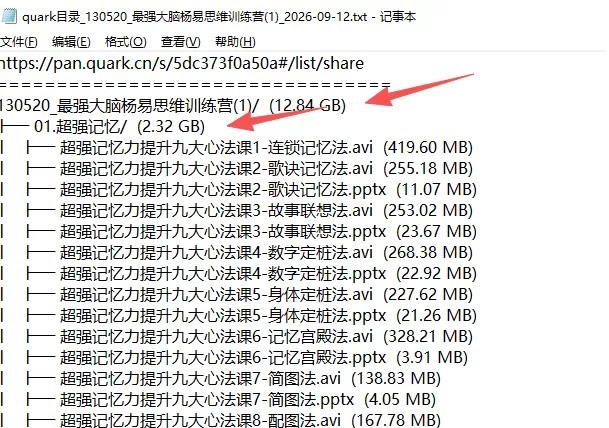
主要用途:拿到别人分享的夸克链接后,在未登录状态下,本程序可以看到“里面有什么、多大、几层”,并将目录结构保存为Txt文档。
成品在最后。
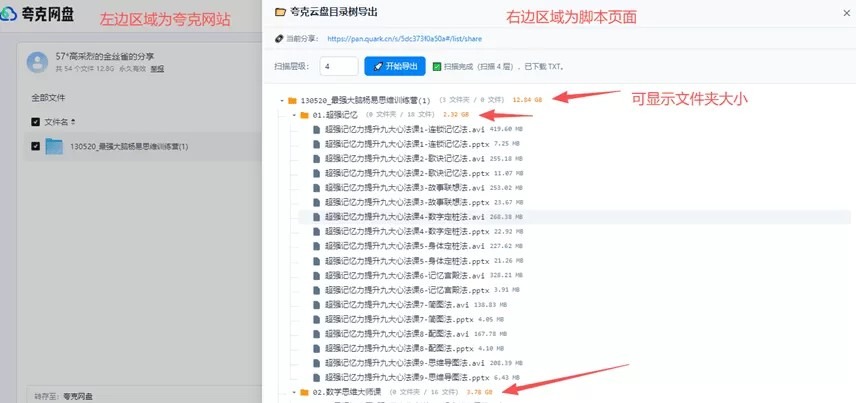
程序效果演示:
1.油猴脚本演示
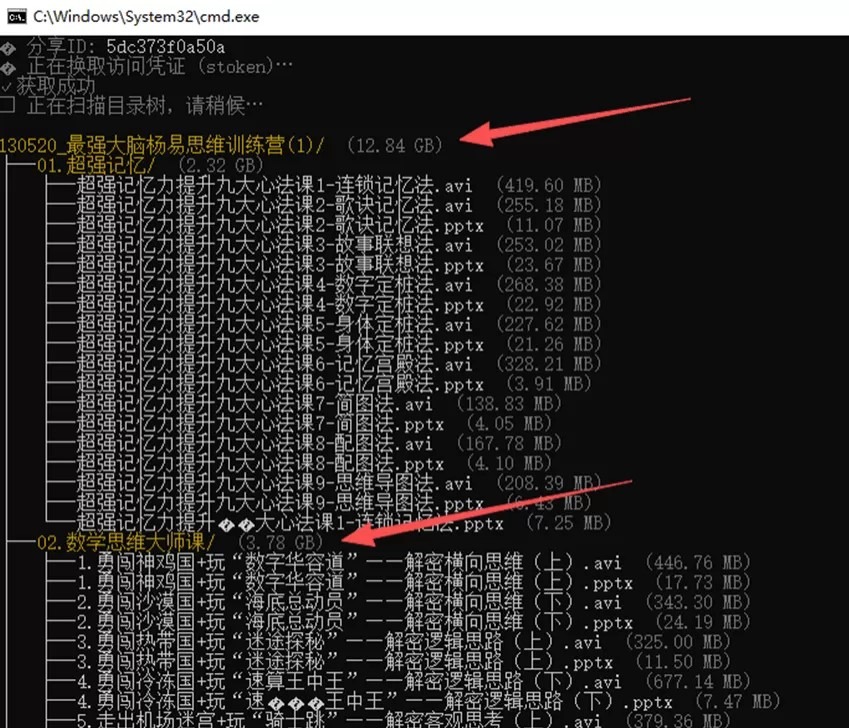
2.Nodejs cli演示
3.导出的文本文件内容
这个程序我做了2个版本:
1.油猴版
点击浏览器上的油猴图标,选择添加新脚本。
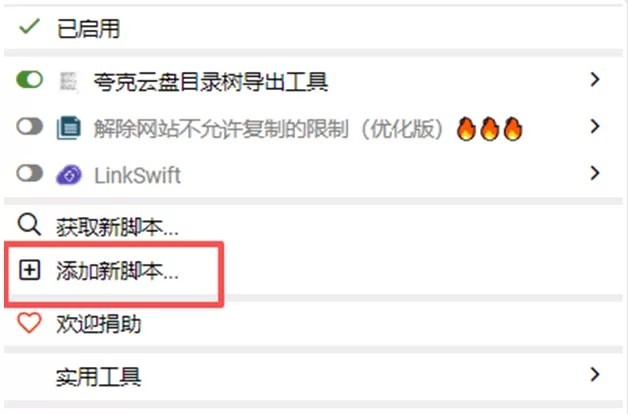
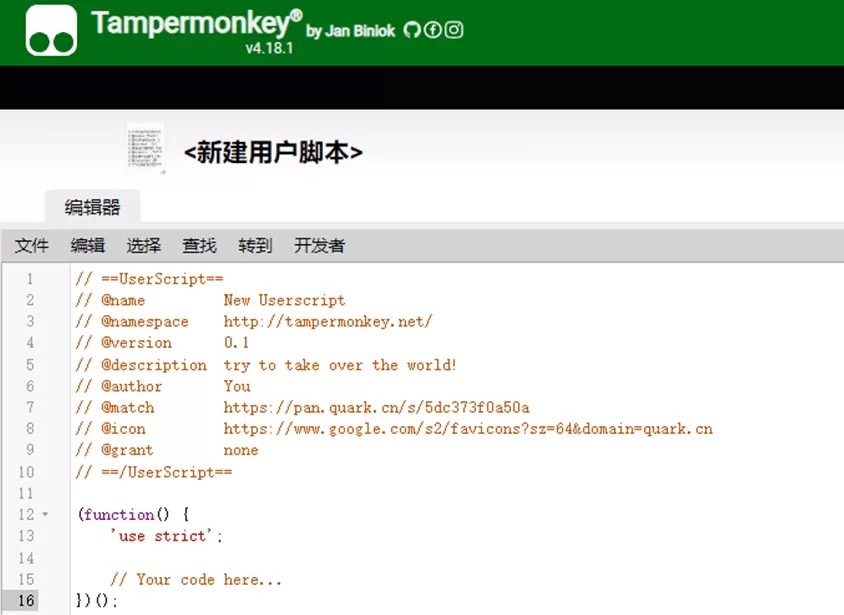
先把下面的编辑框内容清空,复制附件中quark-tree-export.user.js里的全部代码,粘贴进来,按Ctrl+S保存。
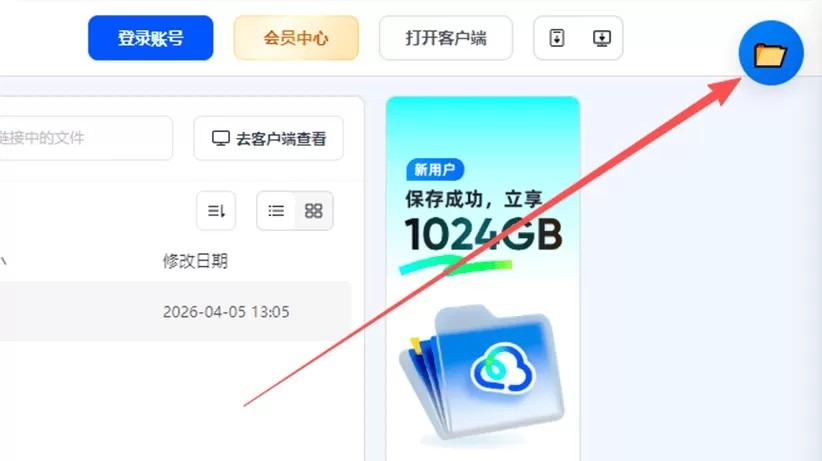
随便打开一个夸克云盘的分享链接,比如https://pan.quark.cn/s/bb5401ef712a,在浏览器页面的右上角点击文件夹图标,即可获取全部内容。
这个脚本未上架各个脚本站,主要是网络不好,打不开。
quark-tree-export.user.js的代码如下:
- // ==UserScript==
- // @name 夸克云盘目录树导出工具
- // @namespace quark-tree-export
- // @version 1.0.0
- // @description 免登录导出夸克分享目录树,支持层级展开、文件大小、TXT/Markdown 导出
- // @author wallechfox
- // @match https://pan.quark.cn/s/*
- // @match https://pan.quark.cn/*
- // @grant GM_setClipboard
- // @run-at document-idle
- // @license MIT
- // ==/UserScript==
- (function () {
- ‘use strict’;
- // ============ 配置 ============
- const API = “https://drive-pc.quark.cn/1/clouddrive/share/sharepage/detail”;
- const CONCURRENCY = 8;
- const RETRY = 4;
- const PAGE_SIZE = 50;
- // ============ 状态 ============
- let shareInfo = null;
- let shareFolderName = “”;
- let isScanning = false;
- let lastItems = [];
- let lastTree = null;
- let lastResultText = “”;
- let pageCache = new Map();
- const sleep = t => new Promise(r => setTimeout(r, t));
- // ============ 分享信息 ============
- function getShareInfo() {
- let pwd_id = null, stoken = “”, title = “”;
- try {
- const raw = sessionStorage.getItem(“_share_args”);
- if (raw) {
- const parsed = JSON.parse(raw);
- const val = parsed.value || parsed;
- if (val && val.pwd_id) {
- pwd_id = val.pwd_id;
- stoken = val.stoken || “”;
- title = val.title || val.share_title || val.name || val.share_name || val.pwd_name || “”;
- }
- }
- } catch (e) { /* ignore */ }
- if (!pwd_id) {
- const m = location.pathname.match(/\/s\/([a-zA-Z0-9]+)/);
- if (m) pwd_id = m[1];
- }
- if (!title && document.title) {
- title = document.title.replace(/[-_—|]\s*夸克[^\s]*.*$/, “”).trim()
- .replace(/^【.*?】/, “”).trim();
- }
- if (!pwd_id) return null;
- return { pwd_id, stoken, title: title || “” };
- }
- function ensureShareInfo() {
- shareInfo = getShareInfo();
- return !!shareInfo;
- }
- // ============ API 请求 ============
- async function fetchPage(fid, page) {
- if (page === 1 && pageCache.has(fid)) return pageCache.get(fid);
- const params = new URLSearchParams({
- pr: “ucpro”, fr: “pc”,
- pwd_id: shareInfo.pwd_id,
- stoken: shareInfo.stoken || “”,
- pdir_fid: fid, force: “0”,
- _page: String(page), _size: String(PAGE_SIZE)
- });
- for (let i = 0; i < RETRY; i++) {
- try {
- const r = await fetch(`${API}?${params}`, { credentials: “include” });
- if (r.status === 400) throw new Error(“参数失效(可能需要输入提取码)”);
- if (!r.ok) throw new Error(`HTTP ${r.status}`);
- const j = await r.json();
- extractShareName(j);
- if (page === 1) pageCache.set(fid, j);
- return j;
- } catch (e) {
- if (i === RETRY – 1) { console.error(“[quark-tree] fetchPage failed:”, e); return null; }
- await sleep(800 + Math.random() * 1200);
- }
- }
- return null;
- }
- function extractShareName(j) {
- if (!j || !j.data || shareFolderName) return;
- const d = j.data;
- const s = d.share || {};
- shareFolderName =
- d.share_title || s.share_title || s.title || s.share_name || s.pwd_name ||
- d.title || d.folder_name || d.share_folder_name || s.folder_name || d.name || “”;
- }
- async function fetchShareMeta() {
- pageCache.clear();
- await fetchPage(“0”, 1);
- }
- async function listAll(fid) {
- const all = [];
- let page = 1;
- while (true) {
- const j = await fetchPage(fid, page);
- if (!j || !j.data || !Array.isArray(j.data.list) || j.data.list.length === 0) break;
- all.push(…j.data.list);
- const total = j.data.total || 0;
- if (all.length >= total || j.data.list.length < PAGE_SIZE) break;
- page++;
- await sleep(80 + Math.random() * 120);
- }
- return all;
- }
- // ============ 扫描 ============
- async function scanRoot(depth) {
- const items = [];
- const visited = new Set([“0”]);
- const queue = [{ fid: “0”, path: “”, depth: 0, isFolder: true, size: 0 }];
- async function worker() {
- while (queue.length > 0) {
- const task = queue.shift();
- if (!task) break;
- if (task.depth > depth) continue;
- const list = await listAll(task.fid);
- for (const it of list) {
- const full = (task.path ? task.path : “”) + “/” + it.file_name;
- items.push({ path: full, size: it.size || 0, isFolder: !!it.dir });
- if (it.dir && !visited.has(it.fid)) {
- visited.add(it.fid);
- queue.push({ fid: it.fid, path: full, depth: task.depth + 1, isFolder: true, size: 0 });
- }
- }
- }
- }
- await Promise.all(Array.from({ length: CONCURRENCY }, () => worker()));
- return items;
- }
- // ============ 构建树 ============
- function buildTree(items) {
- const root = { name: “ROOT”, isFolder: true, size: 0, children: {} };
- for (const item of items) {
- const parts = item.path.split(“/”).filter(Boolean);
- let node = root;
- for (let i = 0; i < parts.length; i++) {
- const part = parts[i];
- const isLast = i === parts.length – 1;
- if (!node.children[part]) {
- node.children[part] = { name: part, isFolder: false, size: 0, children: {} };
- }
- const child = node.children[part];
- if (isLast) {
- child.isFolder = item.isFolder;
- child.size = item.size || 0;
- } else {
- child.isFolder = true;
- }
- node = child;
- }
- }
- computeFolderSizes(root);
- return root;
- }
- function computeFolderSizes(node) {
- let total = node.isFolder ? 0 : (node.size || 0);
- for (const k of Object.keys(node.children)) {
- total += computeFolderSizes(node.children[k]);
- }
- if (node.isFolder) node.size = total;
- return total;
- }
- function countChildren(node) {
- const keys = Object.keys(node.children);
- let folders = 0, files = 0;
- for (const k of keys) node.children[k].isFolder ? folders++ : files++;
- return { folders, files, total: keys.length };
- }
- function formatSize(bytes) {
- if (!bytes) return “”;
- const units = [“B”, “KB”, “MB”, “GB”, “TB”];
- let v = bytes, i = 0;
- while (v >= 1024 && i < units.length – 1) { v /= 1024; i++; }
- return v.toFixed(i === 0 ? 0 : 2) + ” ” + units[i];
- }
- function generateTreeText(root) {
- const lines = [];
- function walk(children, prefix, isTop) {
- for (let i = 0; i < children.length; i++) {
- const child = children[i];
- const isLast = i === children.length – 1;
- let line = prefix + (isTop ? “” : (isLast ? “└── ” : “├── “));
- line += child.name + (child.isFolder ? “/” : “”);
- if (child.size) line += ” (” + formatSize(child.size) + “)”;
- lines.push(line);
- if (child.isFolder) {
- const childChildren = sortedKeys(child).map(k => child.children[k]);
- walk(childChildren, prefix + (isLast ? ” ” : “│ “), false);
- }
- }
- }
- walk(sortedKeys(root).map(k => root.children[k]), “”, true);
- return lines.join(“\n”);
- }
- // ============ 下载 ============
- function downloadTxt(text, filename) {
- const blob = new Blob([text], { type: “text/plain;charset=utf-8” });
- const url = URL.createObjectURL(blob);
- const a = document.createElement(“a”);
- a.href = url; a.download = filename || “quark目录.txt”;
- document.body.appendChild(a); a.click();
- document.body.removeChild(a);
- setTimeout(() => URL.revokeObjectURL(url), 4000);
- }
- function escapeHtml(s) {
- const div = document.createElement(“div”);
- div.textContent = s;
- return div.innerHTML;
- }
- // ============ 样式(浅色主题) ============
- const STYLE = `
- #qte-fab {
- position: fixed; top: 16px; right: 16px; z-index: 2147483647;
- width: 52px; height: 52px; border-radius: 50%;
- background: linear-gradient(135deg, #3b82f6, #2563eb);
- color: #fff; border: none; cursor: pointer;
- box-shadow: 0 4px 16px rgba(0,0,0,.15);
- display: flex; align-items: center; justify-content: center;
- font-size: 24px; transition: transform .2s;
- }
- #qte-fab:hover { transform: scale(1.08); }
- #qte-mask {
- position: fixed; inset: 0; z-index: 2147483646;
- background: rgba(0,0,0,.2); display: none;
- }
- #qte-mask.show { display: block; }
- #qte-drawer {
- position: fixed; top: 0; right: 0;
- width: 75vw; max-width: 1000px; min-width: 400px; height: 100vh;
- background: #ffffff; color: #1e293b;
- z-index: 2147483647;
- transform: translateX(100%);
- transition: transform .28s ease;
- display: grid;
- grid-template-rows: auto auto auto 1fr auto;
- box-shadow: -4px 0 20px rgba(0,0,0,.1);
- overflow: hidden;
- font-family: -apple-system, “Segoe UI”, Roboto, “Microsoft YaHei”, sans-serif;
- }
- #qte-drawer.show { transform: translateX(0); }
- #qte-head {
- padding: 12px 20px; background: #f8fafc;
- display: flex; align-items: center; justify-content: space-between;
- border-bottom: 1px solid #e2e8f0;
- }
- #qte-title { font-size: 16px; font-weight: 600; color: #1e293b; }
- #qte-close {
- background: none; border: none; color: #64748b; font-size: 26px;
- cursor: pointer; line-height: 1;
- }
- #qte-close:hover { color: #1e293b; }
- #qte-url-bar {
- padding: 8px 20px; background: #f8fafc;
- border-bottom: 1px solid #e2e8f0;
- font-size: 12px; color: #64748b;
- display: flex; align-items: center; gap: 8px;
- }
- #qte-url-bar a { color: #3b82f6; text-decoration: none; word-break: break-all; }
- #qte-url-bar a:hover { text-decoration: underline; }
- #qte-controls {
- padding: 12px 20px; background: #f8fafc;
- border-bottom: 1px solid #e2e8f0;
- }
- .qte-ctrl-row { display: flex; gap: 10px; align-items: center; flex-wrap: wrap; }
- .qte-label { font-size: 13px; color: #64748b; }
- .qte-depth {
- width: 64px; padding: 5px 8px; background: #fff; color: #1e293b;
- border: 1px solid #cbd5e1; border-radius: 6px; font-size: 13px;
- }
- .qte-btn {
- background: #3b82f6; color: #fff; border: none; padding: 6px 14px;
- border-radius: 6px; cursor: pointer; font-size: 13px;
- }
- .qte-btn:hover { background: #2563eb; }
- .qte-btn.ghost { background: #e2e8f0; color: #1e293b; }
- .qte-btn.ghost:hover { background: #cbd5e1; }
- .qte-btn:disabled { opacity: .5; cursor: not-allowed; }
- #qte-progress { font-size: 12px; color: #64748b; }
- #qte-tree-wrap {
- min-height: 0; min-width: 0;
- overflow-y: auto; overflow-x: auto;
- overscroll-behavior: contain;
- padding: 16px 20px; background: #ffffff;
- }
- #qte-tree-wrap::-webkit-scrollbar { width: 8px; height: 8px; }
- #qte-tree-wrap::-webkit-scrollbar-track { background: #f1f5f9; }
- #qte-tree-wrap::-webkit-scrollbar-thumb { background: #cbd5e1; border-radius: 4px; }
- #qte-tree-wrap::-webkit-scrollbar-thumb:hover { background: #94a3b8; }
- #qte-tree-wrap { scrollbar-width: thin; scrollbar-color: #cbd5e1 #f1f5f9; }
- #qte-tree {
- font-family: “Consolas”, “Microsoft YaHei”, monospace;
- font-size: 13px; line-height: 1.7;
- }
- #qte-tree ul {
- list-style: none; padding-left: 20px; margin: 0;
- position: relative;
- }
- #qte-tree > ul { padding-left: 0; }
- #qte-tree ul::before {
- content: ”; position: absolute; left: 6px; top: 0; bottom: 8px;
- width: 1px; background: #cbd5e1; opacity: .6;
- }
- #qte-tree > ul::before { display: none; }
- #qte-tree li { position: relative; }
- .qte-node {
- display: flex; align-items: center; padding: 1px 6px;
- border-radius: 3px; cursor: pointer; user-select: none;
- }
- .qte-node:hover { background: #f1f5f9; }
- .qte-node::before {
- content: ”; position: absolute; left: -14px; top: 14px;
- width: 14px; height: 1px; background: #cbd5e1; opacity: .6;
- }
- #qte-tree > ul > li > .qte-node::before { display: none; }
- .qte-arrow {
- width: 14px; height: 14px; margin-right: 2px; flex-shrink: 0;
- transition: transform .15s; fill: #64748b;
- }
- .qte-arrow.expanded { transform: rotate(90deg); }
- .qte-arrow.hidden { visibility: hidden; }
- .qte-icon { width: 16px; height: 16px; margin-right: 6px; flex-shrink: 0; }
- .qte-name { white-space: nowrap; color: #1e293b; }
- .qte-meta { color: #94a3b8; font-size: 11px; margin-left: 8px; }
- .qte-size { color: #64748b; font-size: 11px; margin-left: 8px; }
- .qte-folder-size { color: #d97706; font-size: 11px; margin-left: 8px; }
- #qte-foot {
- padding: 10px 20px; background: #f8fafc;
- border-top: 1px solid #e2e8f0;
- display: flex; gap: 8px; align-items: center; flex-wrap: wrap;
- }
- `;
- function injectStyle() {
- const style = document.createElement(“style”);
- style.textContent = STYLE;
- document.head.appendChild(style);
- }
- // ============ 浮动按钮 ============
- function createFab() {
- const fab = document.createElement(“button”);
- fab.id = “qte-fab”;
- fab.title = “夸克目录树导出”;
- fab.textContent = “📂”;
- fab.addEventListener(“click”, toggleDrawer);
- document.body.appendChild(fab);
- }
- // ============ 抽屉面板 ============
- function createDrawer() {
- const mask = document.createElement(“div”);
- mask.id = “qte-mask”;
- mask.addEventListener(“click”, closeDrawer);
- const drawer = document.createElement(“div”);
- drawer.id = “qte-drawer”;
- drawer.innerHTML = `
- <div id=”qte-head”>
- <span id=”qte-title”>📂 夸克云盘目录树导出</span>
- <button id=”qte-close”>×</button>
- </div>
- <div id=”qte-url-bar”>
- 🔗 当前分享:<a href=”${escapeHtml(location.href)}” target=”_blank” id=”qte-url-link”>${escapeHtml(location.href)}</a>
- </div>
- <div id=”qte-controls”>
- <div class=”qte-ctrl-row”>
- <span class=”qte-label”>扫描层级:</span>
- <input type=”number” class=”qte-depth” id=”qte-scan-depth” min=”1″ max=”20″ value=”4″>
- <button class=”qte-btn” id=”qte-export”>🚀 开始导出</button>
- <span id=”qte-progress”></span>
- </div>
- </div>
- <div id=”qte-tree-wrap”>
- <div id=”qte-tree”></div>
- </div>
- <div id=”qte-foot”>
- <button class=”qte-btn” id=”qte-download”>⬇ 下载 TXT</button>
- <button class=”qte-btn ghost” id=”qte-copy”>📋 复制路径</button>
- <button class=”qte-btn ghost” id=”qte-expand-all”>展开全部</button>
- <button class=”qte-btn ghost” id=”qte-collapse-all”>折叠全部</button>
- <span class=”qte-label” id=”qte-count” style=”margin-left:auto;”></span>
- </div>
- `;
- document.body.appendChild(mask);
- document.body.appendChild(drawer);
- drawer.style.setProperty(“position”, “fixed”, “important”);
- drawer.style.setProperty(“top”, “0”, “important”);
- drawer.style.setProperty(“right”, “0”, “important”);
- drawer.style.setProperty(“height”, “100vh”, “important”);
- drawer.style.setProperty(“display”, “grid”, “important”);
- drawer.style.setProperty(“grid-template-rows”, “auto auto auto 1fr auto”, “important”);
- drawer.style.setProperty(“overflow”, “hidden”, “important”);
- drawer.style.setProperty(“z-index”, “2147483647”, “important”);
- const treeWrap = drawer.querySelector(“#qte-tree-wrap”);
- treeWrap.style.setProperty(“min-height”, “0”, “important”);
- treeWrap.style.setProperty(“height”, “auto”, “important”);
- treeWrap.style.setProperty(“overflow-y”, “scroll”, “important”);
- treeWrap.style.setProperty(“overflow-x”, “auto”, “important”);
- treeWrap.style.setProperty(“overscroll-behavior”, “contain”, “important”);
- const treeEl = drawer.querySelector(“#qte-tree”);
- treeEl.style.setProperty(“display”, “block”, “important”);
- treeEl.style.setProperty(“height”, “auto”, “important”);
- treeEl.style.setProperty(“max-height”, “none”, “important”);
- drawer.querySelector(“#qte-close”).addEventListener(“click”, closeDrawer);
- drawer.querySelector(“#qte-export”).addEventListener(“click”, doExport);
- drawer.querySelector(“#qte-download”).addEventListener(“click”, () => {
- if (!lastResultText) { alert(“暂无导出内容,请先导出。”); return; }
- downloadTxt(lastResultText, `quark目录_${shareInfo ? shareInfo.pwd_id : “”}.txt`);
- });
- drawer.querySelector(“#qte-copy”).addEventListener(“click”, async () => {
- if (!lastResultText) { alert(“暂无导出内容”); return; }
- try { await navigator.clipboard.writeText(lastResultText); alert(“已复制到剪贴板”); }
- catch (e) {
- if (typeof GM_setClipboard !== “undefined”) { GM_setClipboard(lastResultText); alert(“已复制到剪贴板”); }
- else alert(“复制失败:” + e.message);
- }
- });
- drawer.querySelector(“#qte-expand-all”).addEventListener(“click”, expandAll);
- drawer.querySelector(“#qte-collapse-all”).addEventListener(“click”, collapseAll);
- return drawer;
- }
- function toggleDrawer() {
- const drawer = document.getElementById(“qte-drawer”) || createDrawer();
- const mask = document.getElementById(“qte-mask”);
- if (drawer.classList.contains(“show”)) closeDrawer();
- else openDrawer();
- }
- function openDrawer() {
- let drawer = document.getElementById(“qte-drawer”);
- if (!drawer) drawer = createDrawer();
- const mask = document.getElementById(“qte-mask”);
- drawer.classList.add(“show”);
- mask.classList.add(“show”);
- const link = document.getElementById(“qte-url-link”);
- if (link) {
- link.href = location.href;
- link.textContent = location.href;
- }
- }
- function closeDrawer() {
- const drawer = document.getElementById(“qte-drawer”);
- const mask = document.getElementById(“qte-mask”);
- if (drawer) drawer.classList.remove(“show”);
- if (mask) mask.classList.remove(“show”);
- }
- // ============ 树形渲染 ============
- function renderTree(root) {
- const container = document.getElementById(“qte-tree”);
- container.innerHTML = “”;
- const ul = document.createElement(“ul”);
- renderChildren(ul, root);
- container.appendChild(ul);
- }
- function sortedKeys(node) {
- return Object.keys(node.children).sort((a, b) => {
- const af = node.children[a].isFolder;
- const bf = node.children[b].isFolder;
- if (af !== bf) return af ? -1 : 1;
- return a.localeCompare(b, “zh-CN”);
- });
- }
- function renderChildren(ul, parentNode) {
- for (const key of sortedKeys(parentNode)) {
- ul.appendChild(createNodeEl(parentNode.children[key]));
- }
- }
- function createNodeEl(node) {
- const li = document.createElement(“li”);
- li.className = node.isFolder ? “qte-folder” : “qte-file”;
- li._node = node;
- const row = document.createElement(“div”);
- row.className = “qte-node”;
- const arrow = document.createElementNS(“http://www.w3.org/2000/svg”, “svg”);
- arrow.setAttribute(“class”, “qte-arrow” + (node.isFolder ? “” : ” hidden”));
- arrow.setAttribute(“viewBox”, “0 0 24 24”);
- arrow.innerHTML = ‘<path d=”M10 17l5-5-5-5v10z”/>’;
- const icon = document.createElementNS(“http://www.w3.org/2000/svg”, “svg”);
- icon.setAttribute(“class”, “qte-icon”);
- icon.setAttribute(“viewBox”, “0 0 24 24”);
- if (node.isFolder) {
- icon.setAttribute(“fill”, “#f59e0b”);
- icon.innerHTML = ‘<path d=”M10 4H4c-1.1 0-1.99.9-1.99 2L2 18c0 1.1.9 2 2 2h16c1.1 0 2-.9 2-2V8c0-1.1-.9-2-2-2h-8l-2-2z”/>’;
- } else {
- icon.setAttribute(“fill”, “#64748b”);
- icon.innerHTML = ‘<path d=”M14 2H6c-1.1 0-1.99.9-1.99 2L4 20c0 1.1.89 2 1.99 2H18c1.1 0 2-.9 2-2V8l-6-6z”/>’;
- }
- const name = document.createElement(“span”);
- name.className = “qte-name”;
- name.textContent = node.name;
- row.appendChild(arrow);
- row.appendChild(icon);
- row.appendChild(name);
- if (node.isFolder) {
- const c = countChildren(node);
- const meta = document.createElement(“span”);
- meta.className = “qte-meta”;
- meta.textContent = c.total > 0 ? `(${c.folders} 文件夹 / ${c.files} 文件)` : “(空)”;
- row.appendChild(meta);
- const sz = formatSize(node.size);
- if (sz) {
- const sizeEl = document.createElement(“span”);
- sizeEl.className = “qte-folder-size”;
- sizeEl.textContent = sz;
- row.appendChild(sizeEl);
- }
- } else if (node.size) {
- const sz = document.createElement(“span”);
- sz.className = “qte-size”;
- sz.textContent = formatSize(node.size);
- row.appendChild(sz);
- }
- li.appendChild(row);
- if (node.isFolder) {
- const childUl = document.createElement(“ul”);
- childUl.style.display = “none”;
- li.appendChild(childUl);
- row.addEventListener(“click”, () => {
- const hidden = childUl.style.display === “none”;
- if (hidden) {
- if (childUl.children.length === 0) renderChildren(childUl, node);
- childUl.style.display = “block”;
- arrow.classList.add(“expanded”);
- } else {
- childUl.style.display = “none”;
- arrow.classList.remove(“expanded”);
- }
- });
- }
- return li;
- }
- function expandAll() {
- if (!lastTree) return;
- const container = document.getElementById(“qte-tree”);
- container.innerHTML = “”;
- const ul = document.createElement(“ul”);
- renderAll(ul, lastTree);
- container.appendChild(ul);
- }
- function renderAll(ul, node) {
- for (const key of sortedKeys(node)) {
- const child = node.children[key];
- const li = createNodeEl(child);
- ul.appendChild(li);
- if (child.isFolder && Object.keys(child.children).length > 0) {
- const childUl = li.querySelector(“ul”);
- renderAll(childUl, child);
- childUl.style.display = “block”;
- li.querySelector(“.qte-arrow”).classList.add(“expanded”);
- }
- }
- }
- function collapseAll() {
- if (!lastTree) return;
- renderTree(lastTree);
- }
- // ============ 导出主流程 ============
- async function doExport() {
- if (isScanning) return;
- if (!ensureShareInfo()) {
- alert(“未检测到分享信息,请确认当前在夸克分享页面且已输入提取码。”);
- return;
- }
- const scanDepth = parseInt(document.getElementById(“qte-scan-depth”).value, 10);
- if (!scanDepth || scanDepth < 1) { alert(“请输入有效的扫描层级(≥1)”); return; }
- const exportBtn = document.getElementById(“qte-export”);
- const progressEl = document.getElementById(“qte-progress”);
- const treeEl = document.getElementById(“qte-tree”);
- const countEl = document.getElementById(“qte-count”);
- isScanning = true;
- exportBtn.disabled = true;
- exportBtn.textContent = “⏳ 扫描中…”;
- progressEl.textContent = “准备扫描…”;
- treeEl.innerHTML = ‘<div style=”color:#64748b;padding:10px;”>扫描中,请稍候…</div>’;
- shareFolderName = “”;
- try {
- progressEl.textContent = “获取分享信息…”;
- await fetchShareMeta();
- progressEl.textContent = `扫描全部根目录,扫描深度 ${scanDepth}…`;
- const items = await scanRoot(scanDepth);
- items.sort((a, b) => a.path.localeCompare(b.path, “zh-CN”));
- lastItems = items;
- lastTree = buildTree(items);
- const treeText = generateTreeText(lastTree);
- lastResultText = location.href + “\n” + “=================================\n” + treeText;
- renderTree(lastTree);
- expandToDepth(scanDepth);
- const folderCount = items.filter(i => i.isFolder).length;
- const fileCount = items.length – folderCount;
- const totalSize = formatSize(lastTree.size || 0);
- countEl.textContent = `共 ${items.length} 项(文件夹 ${folderCount} / 文件 ${fileCount})` + (totalSize ? `,总计 ${totalSize}` : “”);
- progressEl.textContent = `✅ 扫描完成(扫描 ${scanDepth} 层),已下载 TXT。`;
- downloadTxt(lastResultText, `quark目录_${shareInfo.pwd_id}.txt`);
- } catch (e) {
- console.error(e);
- progressEl.textContent = “❌ 导出失败:” + e.message;
- alert(“导出失败:” + e.message);
- } finally {
- isScanning = false;
- exportBtn.disabled = false;
- exportBtn.textContent = “🚀 开始导出”;
- }
- }
- function expandToDepth(depth) {
- const container = document.getElementById(“qte-tree”);
- if (!container) return;
- function walk(ul, currentDepth) {
- if (currentDepth > depth) return;
- const lis = ul.querySelectorAll(“:scope > li”);
- for (const li of lis) {
- const row = li.querySelector(“:scope > .qte-node”);
- const childUl = li.querySelector(“:scope > ul”);
- if (!row || !childUl) continue;
- const node = li._node;
- if (node && node.isFolder) {
- if (childUl.children.length === 0) {
- renderChildren(childUl, node);
- }
- childUl.style.display = “block”;
- const arrow = row.querySelector(“.qte-arrow”);
- if (arrow) arrow.classList.add(“expanded”);
- walk(childUl, currentDepth + 1);
- }
- }
- }
- const rootUl = container.querySelector(“:scope > ul”);
- if (rootUl) walk(rootUl, 1);
- }
- // ============ 启动 ============
- function init() {
- injectStyle();
- createFab();
- let lastUrl = location.href;
- new MutationObserver(() => {
- if (location.href !== lastUrl) {
- lastUrl = location.href;
- shareInfo = null;
- pageCache.clear();
- const link = document.getElementById(“qte-url-link”);
- if (link) { link.href = location.href; link.textContent = location.href; }
- }
- }).observe(document, { subtree: true, childList: true });
- }
- if (document.body) init();
- else window.addEventListener(“DOMContentLoaded”, init);
- })();
复制代码2.Nodejs cli版。
电脑上需要先安装Nodejs,打开cmd窗口,切换到cli文件夹,输入nodeindex.js https://pan.quark.cn/s/5dc373f0a50a#/list/share,回车后即可下载。
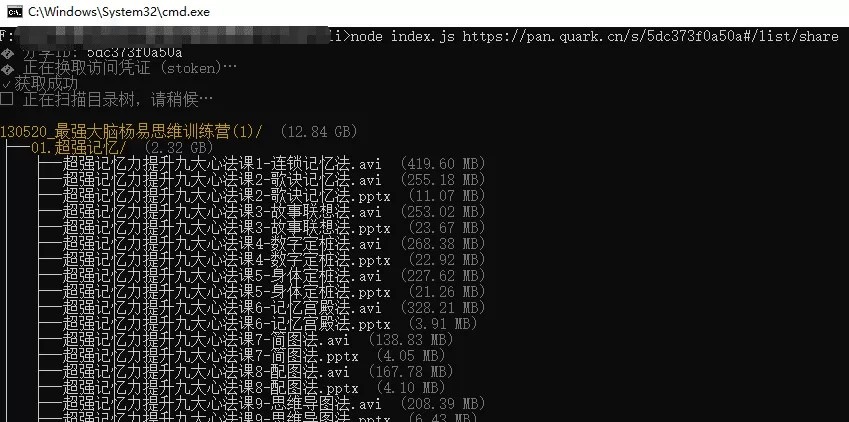
程序用法:
- # 基本用法(自动换 stoken,展开全部层级,自动导出 txt)
- node index.js “https://pan.quark.cn/s/xxxxxx”
- # 控制展开层级
- node index.js “https://pan.quark.cn/s/xxxxxx” –depth 3
- # 折叠模式(只显示第一层)
- node index.js “https://pan.quark.cn/s/xxxxxx” –no-expand
- # 有提取码
- node index.js “https://pan.quark.cn/s/xxxxxx” –passcode abcd
- # 手动指定 stoken(跳过自动换取,最稳的兜底)
- node index.js “https://pan.quark.cn/s/xxxxxx” –stoken “xxx”
- # JSON 输出(不导出 txt,便于管道处理)
- node index.js “https://pan.quark.cn/s/xxxxxx” –json
- # 指定导出文件路径
- node index.js “https://pan.quark.cn/s/xxxxxx” –output “D:\我的目录树\result.txt”
复制代码程序核心代码:
- #!/usr/bin/env node
- /* eslint-disable no-console */
- ‘use strict’;
- /**
- * 夸克云盘分享目录树 CLI(免登录,仅查看公开分享)
- *
- * 用法:
- * node index.js <url> [选项]
- * node index.js # 显示帮助
- *
- * 示例:
- * node index.js “https://pan.quark.cn/s/xxxxxx”
- * node index.js “https://pan.quark.cn/s/xxxxxx” –depth 3
- * node index.js “https://pan.quark.cn/s/xxxxxx” –no-expand
- * node index.js “https://pan.quark.cn/s/xxxxxx” –passcode abcd
- * node index.js “https://pan.quark.cn/s/xxxxxx” –stoken “xxx” # 跳过自动换取
- * node index.js “https://pan.quark.cn/s/xxxxxx” –json
- * node index.js “https://pan.quark.cn/s/xxxxxx” –output result.txt
- *
- * 接口说明:
- * – sharepage/token -> POST {pwd_id, passcode} 换取 stoken
- * – sharepage/detail -> GET ?pwd_id=&stoken=&pdir_fid=&… 拉取文件列表
- */
- const https = require(‘https’);
- const fs = require(‘fs’);
- const path = require(‘path’);
- const { URL } = require(‘url’);
- // ============ 配置 ============
- const API_HOST = ‘drive-pc.quark.cn’;
- const API_PATH = ‘/1/clouddrive/share/sharepage/detail’;
- const PAGE_SIZE = 50;
- const RETRY = 3;
- // ============ Windows 中文乱码修复 ============
- if (process.platform === ‘win32’) {
- require(‘child_process’).execSync(‘chcp 65001 >nul 2>&1’);
- process.stdout.setDefaultEncoding(‘utf-8’);
- process.stderr.setDefaultEncoding(‘utf-8’);
- }
- const sleep = (ms) => new Promise((r) => setTimeout(r, ms));
- // ============ 参数解析 ============
- function parseArgs(argv) {
- const args = {
- _: [],
- depth: Infinity,
- expand: true,
- json: false,
- size: PAGE_SIZE,
- stoken: ”,
- passcode: ”,
- output: ”,
- };
- for (let i = 0; i < argv.length; i++) {
- const a = argv[i];
- switch (a) {
- case ‘-h’:
- case ‘–help’:
- args.help = true;
- break;
- case ‘-d’:
- case ‘–depth’:
- args.depth = parseInt(argv[++i], 10) || 1;
- break;
- case ‘–no-expand’:
- args.expand = false;
- break;
- case ‘-j’:
- case ‘–json’:
- args.json = true;
- break;
- case ‘-s’:
- case ‘–size’:
- args.size = parseInt(argv[++i], 10) || PAGE_SIZE;
- break;
- case ‘–stoken’:
- args.stoken = argv[++i] || ”;
- break;
- case ‘–passcode’:
- case ‘-p’:
- args.passcode = argv[++i] || ”;
- break;
- case ‘-o’:
- case ‘–output’:
- args.output = argv[++i] || ”;
- break;
- default:
- if (a.startsWith(‘-‘)) {
- console.error(`未知参数: ${a}`);
- } else {
- args._.push(a);
- }
- }
- }
- return args;
- }
- function printHelp() {
- console.log(`
- 夸克云盘分享目录树 CLI(免登录,查看公开分享)
- 用法:
- quark-tree <url> [选项]
- 选项:
- -h, –help 显示帮助
- -d, –depth <n> 展开层级,默认全部 (Infinity)
- –no-expand 折叠模式,只显示第一层
- -j, –json 以 JSON 输出目录树(便于程序处理,不导出 txt)
- -s, –size <n> 每页数量 (默认 50)
- –stoken <token> 直接指定 stoken,跳过自动换取
- -p, –passcode <code> 分享提取码
- -o, –output <file> 导出 txt 路径 (默认自动生成)
- 示例:
- node index.js “https://pan.quark.cn/s/xxxxxx”
- node index.js “https://pan.quark.cn/s/xxxxxx” –depth 3
- node index.js “https://pan.quark.cn/s/xxxxxx” –passcode abcd
- node index.js “https://pan.quark.cn/s/xxxxxx” –stoken “xxx” –json
- node index.js “https://pan.quark.cn/s/xxxxxx” –output result.txt
- `.trim());
- }
- // ============ URL / 分享信息 ============
- function parseUrl(raw) {
- try {
- const u = new URL(raw);
- const m = u.pathname.match(/\/s\/([a-zA-Z0-9]+)/);
- if (!m) return null;
- return {
- pwd_id: m[1],
- stoken: u.searchParams.get(‘stoken’) || ”,
- };
- } catch (e) {
- return null;
- }
- }
- // ============ HTTP ============
- function getJSON(url) {
- return new Promise((resolve, reject) => {
- https
- .get(url, (res) => {
- let buf = ”;
- res.on(‘data’, (c) => (buf += c));
- res.on(‘end’, () => {
- try {
- resolve(JSON.parse(buf));
- } catch (e) {
- reject(new Error(‘响应解析失败: ‘ + buf.slice(0, 200)));
- }
- });
- })
- .on(‘error’, reject);
- });
- }
- function postJSON(urlPath, bodyObj) {
- return new Promise((resolve, reject) => {
- const data = JSON.stringify(bodyObj);
- const options = {
- hostname: API_HOST,
- path: urlPath,
- method: ‘POST’,
- headers: {
- ‘Content-Type’: ‘application/json’,
- ‘Content-Length’: Buffer.byteLength(data),
- ‘User-Agent’:
- ‘Mozilla/5.0 (Windows NT 10.0; Win64; x64) AppleWebKit/537.36 (KHTML, like Gecko) Chrome/120.0 Safari/537.36’,
- Referer: ‘https://pan.quark.cn/’,
- Origin: ‘https://pan.quark.cn’,
- },
- };
- const req = https.request(options, (res) => {
- let buf = ”;
- res.on(‘data’, (c) => (buf += c));
- res.on(‘end’, () => {
- try {
- resolve(JSON.parse(buf));
- } catch (e) {
- reject(new Error(‘响应解析失败: ‘ + buf.slice(0, 200)));
- }
- });
- });
- req.on(‘error’, reject);
- req.write(data);
- req.end();
- });
- }
- // ============ 夸克接口 ============
- async function getStoken(pwd_id, passcode) {
- const p = ‘/1/clouddrive/share/sharepage/token’;
- const body = { pwd_id, passcode: passcode || ” };
- let lastErr;
- for (let i = 0; i < RETRY; i++) {
- try {
- const j = await postJSON(p, body);
- if (j && j.data && j.data.stoken) {
- return { stoken: j.data.stoken, title: j.data.title || ” };
- }
- if (j && (j.error_msg || j.message)) {
- throw new Error(j.error_msg || j.message);
- }
- throw new Error(‘换取 stoken 失败:返回结构异常’);
- } catch (e) {
- lastErr = e;
- if (i === RETRY – 1) break;
- await sleep(300 * (i + 1));
- }
- }
- throw lastErr;
- }
- async function fetchPage(pwd_id, stoken, pdir_fid, page, size) {
- const qs = new URLSearchParams({
- pr: ‘ucpro’,
- fr: ‘pc’,
- pwd_id,
- stoken: stoken || ”,
- pdir_fid,
- force: ‘0’,
- _page: String(page),
- _size: String(size),
- });
- const url = `https://${API_HOST}${API_PATH}?${qs.toString()}`;
- let lastErr;
- for (let i = 0; i < RETRY; i++) {
- try {
- const j = await getJSON(url);
- if (j && j.data) return j;
- lastErr = new Error(j?.error_msg || j?.message || ‘接口返回为空’);
- } catch (e) {
- lastErr = e;
- }
- await sleep(300 * (i + 1));
- }
- throw lastErr;
- }
- async function listAll(pwd_id, stoken, pdir_fid, size) {
- const all = [];
- let page = 1;
- while (true) {
- const j = await fetchPage(pwd_id, stoken, pdir_fid, page, size);
- const list = j.data.list || [];
- if (list.length === 0) break;
- all.push(…list);
- const total = j.data.total || 0;
- if (all.length >= total || list.length < size) break;
- page++;
- await sleep(50);
- }
- return all;
- }
- async function scan(pwd_id, stoken, depth, size) {
- const items = [];
- const visited = new Set([‘0’]);
- const queue = [{ fid: ‘0’, path: ”, depth: 0 }];
- async function worker() {
- while (queue.length) {
- const task = queue.shift();
- if (!task || task.depth > depth) continue;
- const list = await listAll(pwd_id, stoken, task.fid, size);
- for (const it of list) {
- const full = (task.path ? task.path : ”) + ‘/’ + it.file_name;
- items.push({
- path: full,
- name: it.file_name,
- size: it.size || 0,
- isFolder: !!it.dir,
- fid: it.fid,
- });
- if (it.dir && !visited.has(it.fid)) {
- visited.add(it.fid);
- queue.push({ fid: it.fid, path: full, depth: task.depth + 1 });
- }
- }
- }
- }
- const concurrency = 8;
- await Promise.all(Array.from({ length: concurrency }, worker));
- return items;
- }
- // ============ 构建树 ============
- function buildTree(items, rootName) {
- const root = { name: rootName || ‘/’, isFolder: true, size: 0, children: {} };
- for (const item of items) {
- const parts = item.path.split(‘/’).filter(Boolean);
- let node = root;
- for (let i = 0; i < parts.length; i++) {
- const part = parts[i];
- const isLast = i === parts.length – 1;
- if (!node.children[part]) {
- node.children[part] = { name: part, isFolder: false, size: 0, children: {} };
- }
- const child = node.children[part];
- if (isLast) {
- child.isFolder = item.isFolder;
- child.size = item.size || 0;
- } else {
- child.isFolder = true;
- }
- node = child;
- }
- }
- function sum(node) {
- if (!node.isFolder) return node.size || 0;
- let t = 0;
- for (const k of Object.keys(node.children)) t += sum(node.children[k]);
- node.size = t;
- return t;
- }
- sum(root);
- return root;
- }
- function sortChildren(node) {
- return Object.keys(node.children)
- .sort((a, b) => {
- const af = node.children[a].isFolder;
- const bf = node.children[b].isFolder;
- if (af !== bf) return af ? -1 : 1;
- return a.localeCompare(b, ‘zh-CN’);
- })
- .map((k) => node.children[k]);
- }
- // ============ 格式化 ============
- function formatSize(bytes) {
- if (!bytes) return ”;
- const units = [‘B’, ‘KB’, ‘MB’, ‘GB’, ‘TB’];
- let v = bytes;
- let i = 0;
- while (v >= 1024 && i < units.length – 1) {
- v /= 1024;
- i++;
- }
- return `${v.toFixed(i === 0 ? 0 : 2)} ${units[i]}`;
- }
- // ============ 终端颜色 ============
- const RED = ‘\x1b[31m’;
- const c = {
- reset: ‘\x1b[0m’,
- bold: ‘\x1b[1m’,
- dim: ‘\x1b[2m’,
- blue: ‘\x1b[34m’,
- green: ‘\x1b[32m’,
- yellow: ‘\x1b[33m’,
- gray: ‘\x1b[90m’,
- cyan: ‘\x1b[36m’,
- };
- function supportsColor() {
- return process.stdout.isTTY && process.env.TERM !== ‘dumb’;
- }
- function paint(str, color) {
- return supportsColor() ? `${color}${str}${c.reset}` : str;
- }
- function renderColor(node, { expandAll, depthLimit }) {
- const lines = [];
- function walk(children, prefix, isTop, currentDepth) {
- for (let i = 0; i < children.length; i++) {
- const child = children[i];
- const isLast = i === children.length – 1;
- const branch = isTop ? ” : isLast ? ‘└── ‘ : ‘├── ‘;
- let name = child.name;
- if (child.isFolder) name = paint(name + ‘/’, c.yellow);
- else name = paint(name, c.reset);
- const sz = formatSize(child.size);
- const sizeStr = sz ? paint(` (${sz})`, c.gray) : ”;
- lines.push(prefix + branch + name + sizeStr);
- if (child.isFolder && Object.keys(child.children).length > 0) {
- const shouldExpand = expandAll || currentDepth < depthLimit;
- if (shouldExpand) {
- walk(
- sortChildren(child),
- prefix + (isTop ? ” : isLast ? ‘ ‘ : ‘│ ‘),
- false,
- currentDepth + 1
- );
- } else {
- const hidden = Object.keys(child.children).length;
- lines.push(
- prefix +
- (isTop ? ” : isLast ? ‘ ‘ : ‘│ ‘) +
- (isLast ? ‘└── ‘ : ‘├── ‘) +
- paint(`… (${hidden} 项,用 –depth 展开)`, c.dim)
- );
- }
- }
- }
- }
- walk(sortChildren(node), ”, true, 1);
- return lines.join(‘\n’);
- }
- function renderText(node, { expandAll, depthLimit }) {
- const lines = [];
- function walk(children, prefix, isTop, currentDepth) {
- for (let i = 0; i < children.length; i++) {
- const child = children[i];
- const isLast = i === children.length – 1;
- const branch = isTop ? ” : isLast ? ‘└── ‘ : ‘├── ‘;
- let line = prefix + branch + child.name + (child.isFolder ? ‘/’ : ”);
- const sz = formatSize(child.size);
- if (sz) line += ` (${sz})`;
- lines.push(line);
- if (child.isFolder && Object.keys(child.children).length > 0) {
- const shouldExpand = expandAll || currentDepth < depthLimit;
- if (shouldExpand) {
- walk(
- sortChildren(child),
- prefix + (isTop ? ” : isLast ? ‘ ‘ : ‘│ ‘),
- false,
- currentDepth + 1
- );
- }
- }
- }
- }
- walk(sortChildren(node), ”, true, 1);
- return lines.join(‘\n’);
- }
- // ============ 导出文件 ============
- function saveToFile(text, args, pwd_id, rootTitle) {
- let filePath;
- if (args.output) {
- filePath = path.resolve(args.output);
- } else {
- const safeTitle = (rootTitle || pwd_id).replace(/[\\/:*?”<>|]/g, ‘_’).slice(0, 50);
- const date = new Date().toISOString().slice(0, 10);
- const fileName = `quark目录_${safeTitle}_${date}.txt`;
- filePath = path.resolve(process.cwd(), fileName);
- }
- fs.writeFileSync(filePath, text, ‘utf-8’);
- return filePath;
- }
- // ============ 主流程 ============
- async function main() {
- const args = parseArgs(process.argv.slice(2));
- if (args.help || args._.length === 0) {
- printHelp();
- process.exit(args.help ? 0 : 1);
- }
- const url = args._[0];
- const info = parseUrl(url);
- if (!info) {
- console.error(paint(‘✗ 无法解析分享链接,请检查是否为 pan.quark.cn/s/xxx 格式’, RED));
- process.exit(1);
- }
- const { pwd_id } = info;
- console.log(paint(‘🔗 分享ID: ‘, c.gray) + pwd_id);
- let stoken = args.stoken || info.stoken;
- let rootTitle = ”;
- if (!stoken) {
- console.log(paint(‘🔑 正在换取访问凭证 (stoken)…’, c.gray));
- try {
- const result = await getStoken(pwd_id, args.passcode);
- stoken = result.stoken;
- rootTitle = result.title;
- console.log(paint(‘✓ 获取成功’, c.gray));
- if (args.passcode) console.log(paint(‘🔒 使用提取码: ‘ + args.passcode, c.gray));
- } catch (e) {
- const msg = String(e.message || ”);
- console.error(paint(‘✗ 换取 stoken 失败: ‘ + msg, RED));
- if (msg.includes(‘passcode’) || msg.includes(‘提取’) || msg.includes(‘密码’)) {
- console.error(paint(‘ 该分享需要提取码,请用 –passcode <code> 指定。’, c.gray));
- } else {
- console.error(
- paint(‘ 可尝试用浏览器打开分享页,F12 复制 stoken 后用 –stoken 指定。’, c.gray)
- );
- }
- process.exit(1);
- }
- } else {
- console.log(paint(‘🔑 使用指定 stoken’, c.gray));
- }
- const userDepth = Number.isFinite(args.depth) ? args.depth : Infinity;
- console.log(paint(‘⏳ 正在扫描目录树,请稍候…\n’, c.gray));
- try {
- const items = await scan(pwd_id, stoken, userDepth, args.size);
- const tree = buildTree(items, rootTitle || pwd_id);
- const folderCount = items.filter((i) => i.isFolder).length;
- const fileCount = items.length – folderCount;
- const plainText = renderText(tree, {
- expandAll: args.expand && !Number.isFinite(args.depth),
- depthLimit: args.depth,
- });
- const header = `${url}\n=================================`;
- const summary =
- `\n\n共 ${items.length} 项(文件夹 ${folderCount} / 文件 ${fileCount})` +
- (tree.size ? `\n总计: ${formatSize(tree.size)}` : ”);
- const resultText = `${header}\n${plainText}${summary}`;
- if (args.json) {
- console.log(JSON.stringify(tree, null, 2));
- } else {
- const expandAll = args.expand && !Number.isFinite(args.depth);
- const renderer = supportsColor() ? renderColor : renderText;
- console.log(renderer(tree, { expandAll, depthLimit: args.depth }));
- console.log(”);
- console.log(
- paint(`共 ${items.length} 项(文件夹 ${folderCount} / 文件 ${fileCount})`, c.gray)
- );
- if (tree.size) console.log(paint(`总计: ${formatSize(tree.size)}`, c.gray));
- }
- // ===== 自动保存 txt(–json 时不导出) =====
- if (!args.json) {
- try {
- const savedPath = saveToFile(resultText, args, pwd_id, rootTitle);
- console.log(paint(`\n📄 已保存: ${savedPath}`, c.green));
- } catch (e) {
- console.error(paint(`\n✗ 保存文件失败: ${e.message}`, RED));
- }
- }
- } catch (e) {
- console.error(paint(‘\n✗ 导出失败: ‘ + e.message, RED));
- process.exit(1);
- }
- }
- main();




![网络检测工具箱1.1 [含源码]](https://3se.cc/wp-content/themes/ceomax-pro/timthumb.php?src=https://3se.cc/wp-content/uploads/2026/10/img_31568_1.png&h=200&w=300&zc=1&a=t&q=100&s=1)

![[原创工具] 易籍—中文线装古籍电子书排版一键生成工具,PDF导出](https://3se.cc/wp-content/themes/ceomax-pro/timthumb.php?src=https://3se.cc/wp-content/uploads/2026/08/2026082218394550.png&h=200&w=300&zc=1&a=t&q=100&s=1)