
文章摘要
WindowsiOS 是一个在非越狱 iPhone 上运行原版 Windows 11 24H2 ARM64 的虚拟机开源项目。它绕开苹果 Hypervisor.framework,自研 ARM64 动态二进制翻译(JIT)、软件 MMU 及完整虚拟 PC 硬件(UEFI/ACPI、NVMe、USB 3.0、声卡、VirtIO 网卡),使 Windows 11 接近原生速度运行,已在折叠屏 iPhone 上端到端验证。项目为源码,需 Apple Silicon Mac + Xcode 自行编译,并自备 Windows 镜像与 UEFI 固件,遵循 GPL-2.0 协议。
WindowsiOS —— 在 iPhone 上运行完整 Windows 11 ARM64(iOS 26/27)介绍
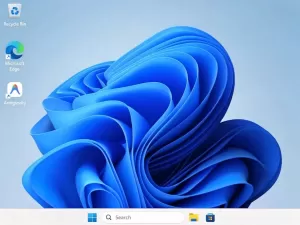
WindowsiOS 是一个在非越狱 iPhone 上运行原版 Windows 11 24H2 ARM64 的虚拟机项目。它绕开苹果的 Hypervisor.framework,自己写了 ARM64→ARM64 动态二进制翻译(JIT)、4KB 页表的软件 MMU,以及 UEFI/ACPI、NVMe、USB 3.0、Intel HD Audio、VirtIO 网卡一整套虚拟 PC 硬件,让 Windows 11 以接近原生的速度运行。作者是在折叠屏 iPhone Duo(A20 Pro)上完成端到端验证的。
- 运行原版 Windows 11 24H2 ARM64,可开 Edge、Electron 应用,并通过 Prism 兼容 x86-64 程序
- 自带虚拟硬件:NVMe 硬盘、USB 键盘鼠标与触屏、双向声卡、NAT 联网
- 折叠屏设备上有「笔记本模式」:上半屏当显示器,下半屏是键盘和触控板
- 通过 iOS 原生 Safari 弹层桥接 Google / Passkey 登录
需要注意:这是源码项目,不是安装包。要用起来必须有 Apple Silicon Mac + Xcode 自行编译,还要自备微软官方 Windows 11 24H2 ARM64 镜像和 UEFI 固件,仓库里不含任何系统镜像或现成 IPA。
主要代码片段
1. 用 ASID 合成用户地址空间键(core/mmu.c)
- uint64_t hv_mmu_ukey(const HvCpu *cpu) {
- int asid = current_asid((HvCpu *)cpu);
- uint64_t pa = cpu->ttbr0_el1 & OA_MASK;
- if (asid <= 0 || !pa) return 0;
- return ((uint64_t)(uint16_t)asid << 48) | pa;
- }
复制代码- int host_align = (op.align || op.kind == HV_MEM_ORDERED) && op.bytes > 1;
- if (host_align) {
- uint32_t k = __builtin_ctz(op.bytes);
- put(e, 0xd1000000u | HV_TLB_ADJ << 10 | U << 5 | U);
- put(e, 0x92400000u | (64u - HV_TLB_PAGE_BITS) << 16
- | (63u - HV_TLB_PAGE_BITS + k) << 10 | U << 5 | U);
- } else {
- if (op.bytes > HV_TLB_ADJ + 1) put_add_imm(e, U, U, op.bytes - 1 - HV_TLB_ADJ);
- put(e, UBFM_X(U, U, HV_TLB_PAGE_BITS, 63));
- }
- put(e, CBNZ_X(U));
复制代码- static void transfer_event_ed(HvXhci *x, int target, uint64_t ev_data, int cc,
- uint32_t edtla, int slot, int dci) {
- event_to(x, target, ev_data,
- (uint32_t)cc << 24 | (edtla & 0xffffffu),
- (1u << 2) /* ED=1 */ | TRB_TRANSFER_EVENT << 10
- | (uint32_t)dci << 16 | (uint32_t)slot << 24);
- }
复制代码Windows 的 USBXHCI.SYS 要求传输事件带累积长度(ED=1 + EDTLA),否则键盘、触屏这类 HID 事件会被直接丢弃。
使用方法
环境要求:Apple Silicon Mac(M1 及以上)、Xcode、xcodegen、meson、ninja、pkg-config、libslirp、llvm/lld、Python 3;一台 iOS 26/27 的 iPhone。Windows 镜像与固件需自备:微软官方 Windows 11 24H2 ARM64 ESD、EDK2 QEMU_EFI.fd、virtio-win 的 NetKVM 驱动。
- # 1. 编译依赖、引擎与测试
- ./scripts/build_ios_deps.sh
- make -j8 all ios-lib test-core
-
- # 2. 制作并精简 Windows 镜像(先把 ESD、固件、驱动放进 work/downloads 与 work/)
- python3 scripts/provision_windows_arm64.py
- python3 scripts/optimize_windows_lite.py
- ./build/hvsparse pack work/windows11_lite.img work/windows11.hvsparse
-
- # 3. 先在 Mac 上试跑
- HV_OAUTH_BRIDGE=1 ./build/winvm --cpus 4 --ram 4608 \
- --bios work/code.fd --vars work/vars.fd --disk work/windows11_lite.img
-
- # 4. 构建并安装到 iPhone(需设备 UDID 与有效签名)
- xcodegen generate --spec ios/project.yml
- xcodebuild -project ios/WindowsiOS.xcodeproj -scheme WindowsiOS -configuration Release -sdk iphoneos build
- xcrun devicectl device install app --device <设备UDID> build/DerivedData/Build/Products/Release-iphoneos/WindowsiOS.app
- ./scripts/launch_on_duo.sh <设备UDID> me.ammaar.windowsios
复制代码安装后需要用脚本里的 LLDB 流程给应用赋予 JIT 权限,否则无法启动;没有 Mac 的话这套流程走不通。
开源地址
本项目转载自 GitHub 开源项目,非本人开发,未做任何修改或破解,遵循 GPL-2.0 协议:
我们的下载地址